
Restaurant Management

The shift list hangs on the kitchen board; who opens on the weekend is found out by phone

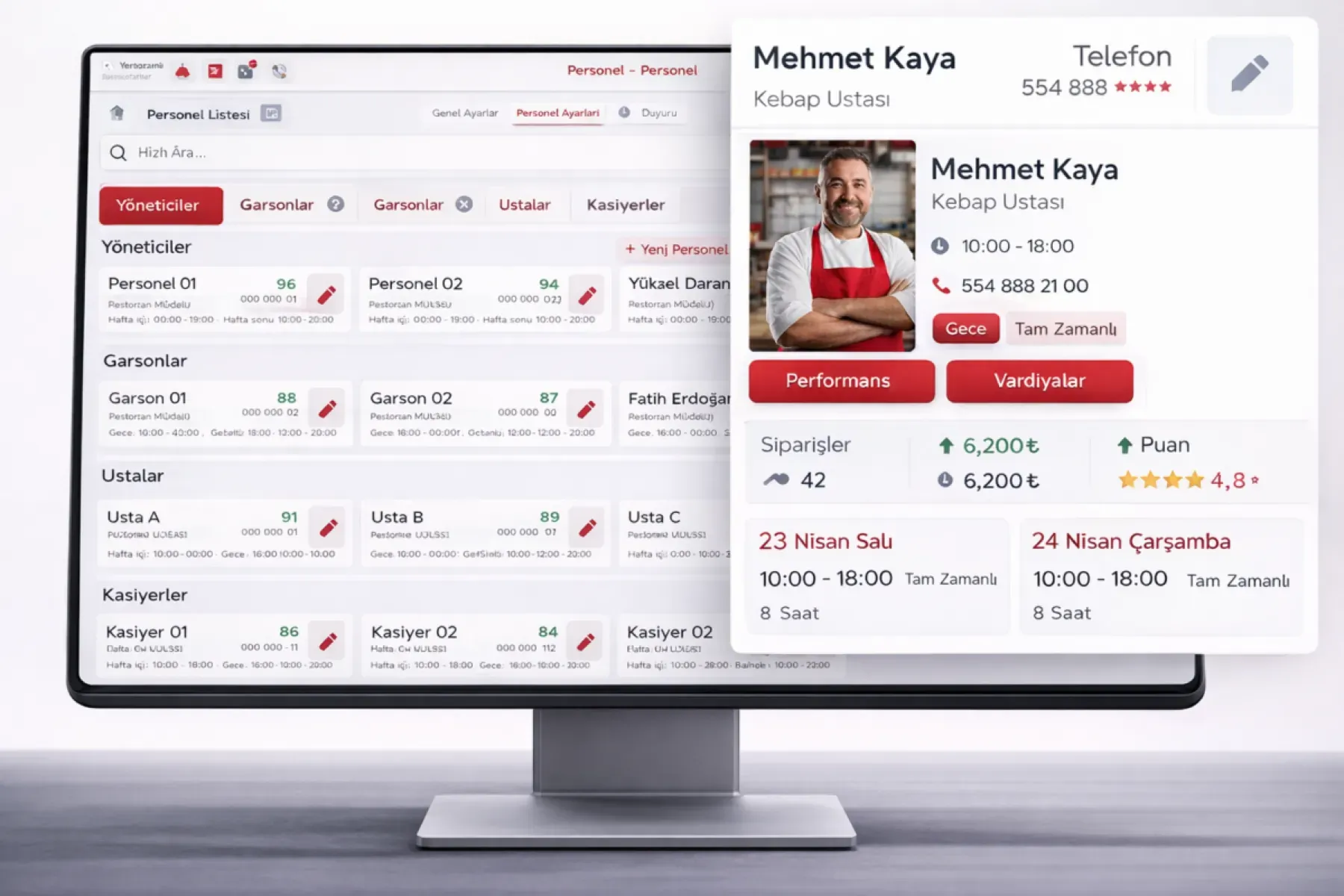
Staff and Shift Management plans waiter, kitchen, bar and courier shifts on one calendar; clock-in and clock-out times are recorded and overtime shows in the report. Role and register permissions are defined on the staff card.

Staff and shift management
In short

Staff and Shift Management is the Panda Restoran module that keeps the shift plan, clock-in and clock-out times, overtime and system permissions for the waiter, kitchen, bar, cashier and courier teams in one place. Daily, weekly and monthly shift calendars are prepared; overlapping shifts and missing staff show in the plan. Each employee's POS, register and void permissions are defined on their card, and a sales report by shift is available.

How is this work done today?

  • The shift plan is on a board, changes are by phone

    The weekly list is written on paper and pinned in the kitchen; swap requests go through a WhatsApp group and the manager tries to remember who swapped with whom.

    1 restaurant manager × 2 hours / week
  • Clock-in and clock-out are verbal

    Who came at what time and left at what time: the timesheet is filled in from memory at month end. Overtime arguments come up on payroll day.

    1 person × 3 hours / month
  • Everyone has the same permissions

    A trainee waiter and the manager can both void at the register; who voided which check is unknown and the end-of-day difference cannot be explained.

    1 cash lead × 30 minutes / day

How does Staff and shift management work?

  1. 1

    Staff cards and roles are defined

    A card is opened for each employee: role (waiter, chef, bartender, cashier, courier), branch, employment type and system permissions. Your current list is imported from Excel.

  2. 2

    The shift calendar is prepared

    Daily, weekly and monthly plans are made by dragging on the calendar; last week's plan can be copied. Overlaps and uncovered stations are flagged on the calendar.

  3. 3

    Clock-in and clock-out are recorded

    Staff clock in to a shift from the register, a tablet or the mobile app; clock-out is taken at closing. Lateness and early leaving are calculated against the plan.

  4. 4

    Overtime and performance report

    Hours worked, overtime and leave are in the monthly report; sales by shift, checks per waiter and average bill come from the same report.

See how Staff and shift management would work in your business

Tell us briefly about your process and we will walk through the screens with your own example.

  • Reply the same business day
  • 15+ years of experience
  • 90 client businesses

Staff and shift management features

Staff and shift management: Central staff card
  • Central staff card

    Name, role, branch, contact, employment type and permissions on one card; temporary assignment between branches is made by record.

  • Flexible shift planning

    Daily, weekly and monthly calendar; opening, closing and split shift templates, and a minimum-staffing alert by station.

  • Clock-in, clock-out and overtime

    Clock-in and out from the register, a tablet or the mobile app; planned and actual hours are compared and overtime and missing hours go in the report.


Staff and shift management: Permission and role management
  • Permission and role management

    Void, discount, complimentary and drawer-open permissions at the POS are defined by role; every action stays in the audit log with who did it.

  • Shift swap requests

    Staff open a swap or leave request from the mobile app; the request goes to the manager for approval and the calendar updates once approved.

  • Sales report by shift

    Each shift's revenue, number of checks and average bill per waiter; peak-hour staffing is planned from this report.

  • Tip and bonus distribution

    Tips taken by card and QR are written to the shift record; the distribution rule is defined by the business and the list goes to payroll.

  • Payroll and HR link

    Hours worked and leave statement are taken as Excel or passed directly to the Panda ERP Staff and Payroll module.

What does Panda AI add to Staff and shift management?

The Finance and Accounting Agent is the Panda AI agent that takes on due-date tracking, bank-to-ERP matching and draft account reconciliations.

  1. Today Bank transactions are matched to the ERP by hand With the agent Unmatched transactions are listed every morning
  2. Today Due-date lists are kept separately in Excel With the agent A cash flow forecast is ready on current data
  3. Today Account reconciliation e-mails are written one by one With the agent Reconciliation e-mails arrive as drafts; approval is yours

Jobs it takes on

  • Due-date and collections tracking
  • Bank-to-ERP matching check
  • Cash flow and budget variance report
  • Draft account reconciliations
  • Invoice and expense inconsistency alerts
  • Month-end closing checklist

The agent prepares, a person approves. Anything that posts a record or sends something outside the company goes through your approval.

Explore Panda AI agents

Frequently asked questions about Staff and shift management

How is the shift plan prepared?

On the calendar screen, staff are dragged to the relevant day and shift; opening, closing and split shift templates are ready. The previous week's plan is copied and edited. A person's overlapping shifts and a short-staffed station are flagged in colour on the calendar; once the plan is published, staff see it in the mobile app.

How are clock-in and clock-out recorded?

Staff clock in to a shift with their own code from the register screen, a tablet or the mobile app; clock-out is taken at closing. Lateness, early leaving and overtime are calculated by comparing planned and actual hours. Record changes can only be made by an authorised manager and are kept in the log.

How is a waiter's permission at the register limited?

The role on the staff card determines permission at the POS for voids, discounts, complimentary items, price changes and opening the drawer. For an action without permission, a manager code is asked. Each action is stored in the audit log with who did it; when an end-of-day difference is explained, the void and complimentary list comes out by staff member.

Is it the same module for a retail store?

Under Panda Store there is a separate Staff and Shift module; the structure is similar, the language and templates differ. The restaurant version has station-based staffing (kitchen, bar, service, courier), a check report by shift and tip distribution. Both can be used together in the same business.

Can staff request a shift swap themselves?

Yes. A swap or leave request is opened from the mobile app; the request is checked against overlaps and legal working hours and goes to the manager for approval. When the manager approves, the calendar updates and both employees are notified. A request without approval does not change the plan.

How does overtime go to payroll?

Monthly hours worked, overtime, weekly rest day and leave statement come out as a report by staff member and are sent to the accountant as Excel. If the Panda ERP Staff and Payroll module is in use, the timesheet is passed directly; payroll is calculated there.

Can staff be shared across several branches?

A staff card is tied to a home branch; with a temporary assignment they are added to another branch's calendar. Clock-in is written to the report of the branch where it was made. Head office sees staffing levels and overtime for all branches on one screen; a branch manager manages only their own branch.

What does the agent do in staff and shift management?

Panda AI checks a shift swap request from mobile against overlaps and legal working hours; if suitable it passes it to the manager for approval, if not it writes the reason. The manager approves the plan; the agent does not change the calendar on its own. The short-staffing alert comes from the same check.

See Staff and shift management with your own data

Describe your process in a few sentences and we will show you the modules that fit.

  • 15+ years of enterprise software experience
  • In the cloud or on your own server
  • Processes compliant with KVKK (Turkey's data protection law)

Last reviewed: · Panda Yazılım product team