

For hauliers

Log the trip, see what is left in your pocket

Seferim is a trip, expense and receivables ledger for hauliers who carry freight with their own vehicle. On every trip, fuel, HGS toll, commission and driver share are deducted from the freight fee; what is left shows instantly.

Truck with a white trailer driving on a motorway
Blue tractor unit and trailer leaving a facility
Aerial view of trucks parked side by side at a rest area
In short

Seferim is a trip and pre-accounting app built for small and mid-sized haulage companies. Trips, expenses, customer receivables, driver accounts and vehicle documents are kept on the phone; the profit of every trip and every vehicle is seen separately. There are iOS and Android apps and a web panel.

  • 01

    A trip is logged in thirty seconds

    Enter the vehicle, customer, origin, destination and freight fee; a trip can also be logged by voice.

  • 02

    A photo of the receipt is enough

    Fuel, HGS toll and meal receipts are photographed; the amount and litres are read from the receipt.

  • 03

    Receivables are not forgotten

    Who owes how much and whether it is overdue shows at a glance; you get a notification on the payment day.

  • 04

    Inspection and insurance are reminded

    You are told before inspection, insurance, comprehensive cover and document dates run out.

Why does the haulier’s ledger never hold up?

  • Receipts stay in the glove box

    Fuel and HGS toll receipts pile up until month end and some get lost; the real expense of a trip is never known.

  • Receivables are kept in your head

    Which customer still owes for which trip cannot be said without looking at the notebook.

  • Profit shows up at month end

    The freight fee looks high, but only afterwards, once fuel, bridge tolls and commission are deducted, do you learn what the trip left.

  • Settling up with the driver drags on

    Advances, allowances and expenses on the road are tracked on paper; settling the account turns into an argument.

Trip, expenses and collection in one account

Every record made on the road is gathered under the same trip; what is left in your pocket is calculated automatically.

How does Seferim look on the phone?

The images are the app’s own screens, taken with sample data.

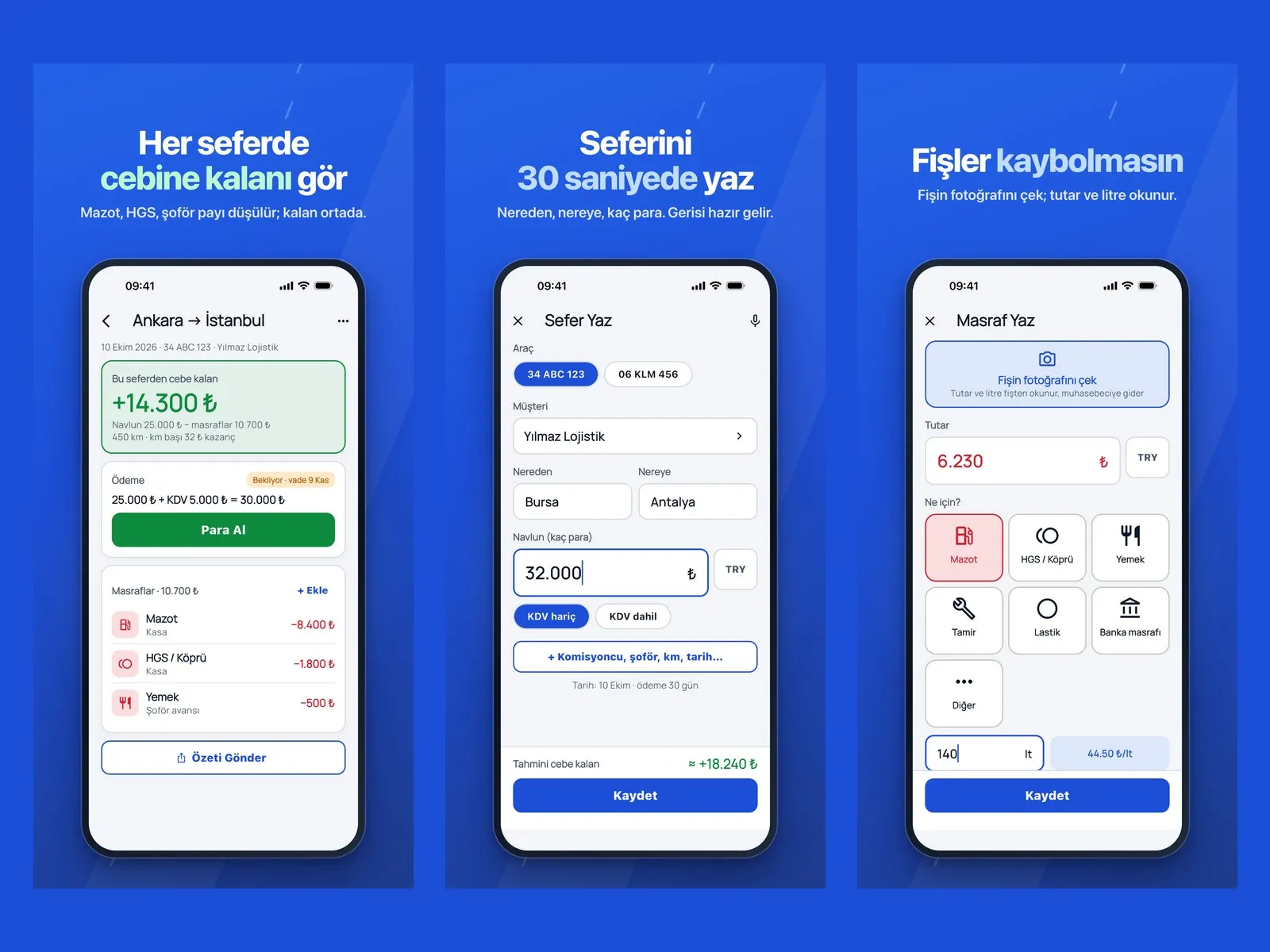
Trip detail, log trip and log expense screens side by side
Trip

The amount left in your pocket is at the top of every trip

The trip detail shows the freight fee, VAT, expenses and collection status together. As expenses are added, the amount left in your pocket updates; a trip summary can be sent to the customer.

  • Freight fee, VAT included or excluded
  • Fuel, HGS toll, meal and commission expenses
  • Log trips by voice, read receipts from a photo
  • Delivery report with signature, photo and location
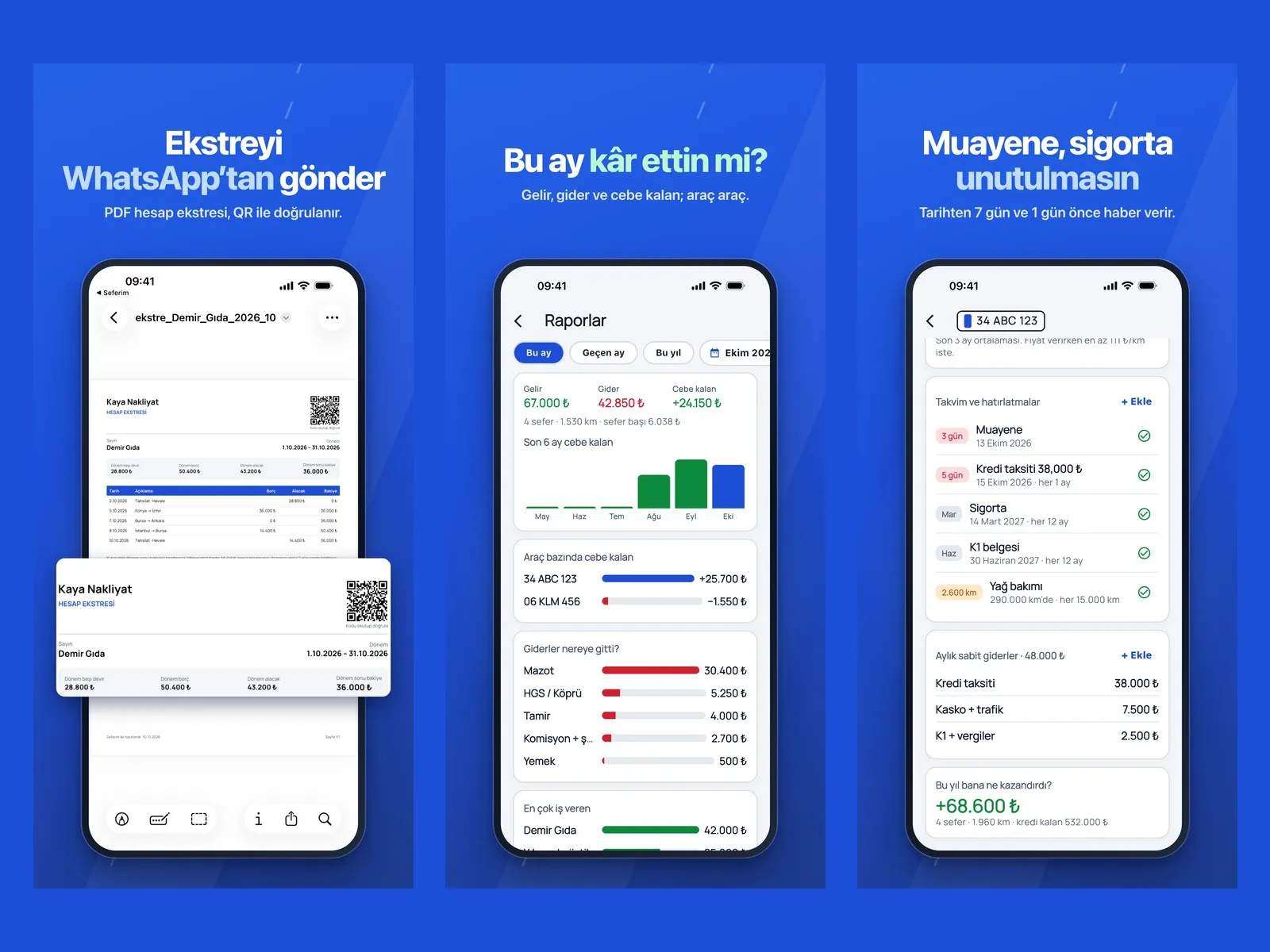
Account statement, reports and vehicle reminders screens side by side
Receivables and reports

Send the statement on WhatsApp, see the month end

The customer account statement is prepared as a PDF, verified with a QR code on it and shared on WhatsApp. The reports screen shows income, expenses and what is left in your pocket by vehicle.

  • PDF statement with QR verification
  • Receivables ageing and due date tracking
  • Profit and loss by vehicle
  • Excel report for the accountant
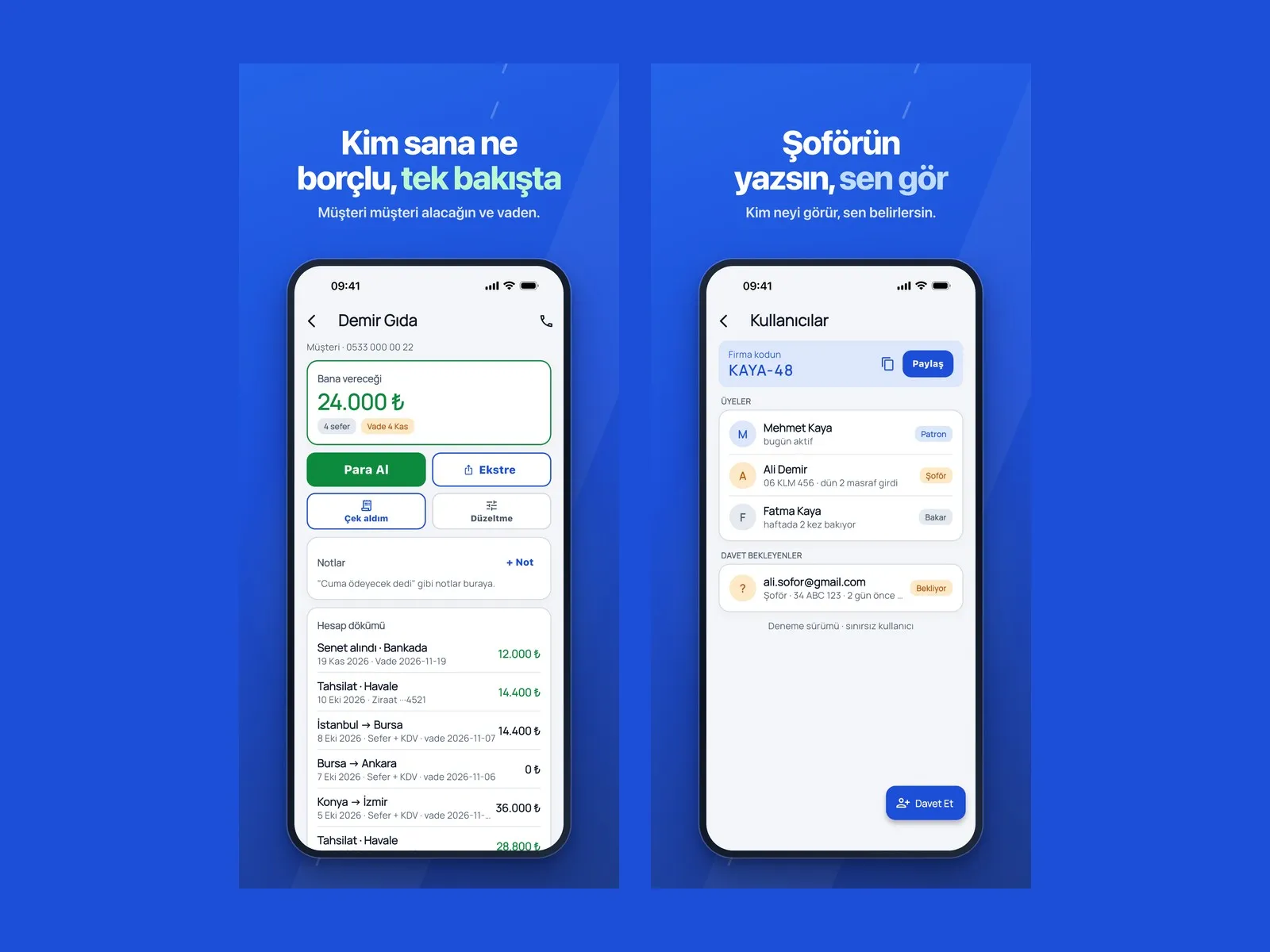
Customer account card and users screen side by side
Team

The driver logs from their own phone, the owner sees it

The driver enters their trip and expenses from their own phone; the owner approves. Receivables and past trips are on the customer card, and the team screen sets who can see what.

  • Owner, manager, driver, accountant and viewer roles
  • Driver settlement PDF
  • Customer account card
  • Follow from the office with the web panel

See how Seferim would work in your business

Tell us briefly about your process and we will walk through the screens with your own example.

  • Reply the same business day
  • 15+ years of experience
  • 90 client businesses

How Seferim differs from a paper ledger

  1. 01 Trip record

    Today

    Written into the notebook in the evening, as much as is remembered.

    With Seferim

    Logged from the phone while loading, or spoken by voice.

  2. 02 Expenses

    Today

    Receipts are saved up and added together at month end.

    With Seferim

    The receipt is photographed; the amount is posted to that trip’s expenses.

  3. 03 Receivables

    Today

    You call the customer and ask “how much was left?”

    With Seferim

    It shows on the account card; the statement is sent on WhatsApp.

  4. 04 Driver account

    Today

    Advances and expenses are added up on paper.

    With Seferim

    The driver settlement comes out as a PDF.

  5. 05 Vehicle documents

    Today

    The inspection date is remembered when the fine arrives.

    With Seferim

    A notification arrives before the date runs out.

How does Seferim work in three steps?

  1. 1

    Log the trip

    Enter where from, where to, for whom and for how much.

    1
  2. 2

    Add the expense

    Take a photo of the receipt; fuel, HGS toll and meals are posted to that trip.

    2
  3. 3

    See what is left in your pocket

    The trip’s profit and the customer’s debt update instantly.

    3

Seferim features

  • Trip ledger

    Trip records with vehicle, customer, route, freight fee, kilometres and date.

  • Expense tracking

    Fuel, HGS toll and bridge, meals, repairs, commission; an HGS statement can be imported.

  • Customer account

    Receivables, payables, due dates and ageing; PDF statement with QR verification.

  • Cheque and payment tracking

    Cheques received and payment promises are tracked with their due dates.

  • Vehicle and document reminders

    Notifications for inspection, insurance, comprehensive cover, operating license and maintenance dates.

  • Driver account

    Advances, shares and expenses on the road; PDF settlement.

  • Reports

    Monthly income, expenses and what is left in your pocket; profit and loss by vehicle and expense breakdown.

  • Delivery report

    A signature, photo and location are taken at delivery and sent to the customer.

  • Roles and approval

    A record entered by the driver goes to the owner for approval; everyone sees only what they are authorized to see.

  • Web panel

    The team in the office reaches the same data from a computer.

  • Multilingual use

    The app is available in thirteen languages; foreign drivers can write in their own language.

  • U-ETDS notification (coming soon)

    The freight transport U-ETDS notification is under development and is not yet available.

What does Panda AI add alongside Seferim?

For Seferim, Panda AI takes on these jobs: Shipment status queries and customer updates; Cost and profitability report per trip; Check for missing delivery notes and paperwork.

  1. Today A rep looks in the ERP to check an order’s status With the agent Order and shipping status answered 24/7
  2. Today Out-of-hours messages wait until morning With the agent Hands over what it cannot solve to the right person
  3. Today Complaints can get lost before they are logged With the agent Every request is logged and reported

Jobs it takes on

  • Shipment status queries and customer updates
  • Cost and profitability report per trip
  • Check for missing delivery notes and paperwork
  • Vehicle maintenance and document expiry reminders
  • Daily operations summary

Sample scenario: A customer asks about the status of their shipment over WhatsApp. The agent checks the system and replies; if there is a delay, it gives the reason and the new estimated time, and logs a note for the operations team.

The agent prepares, a person approves. Anything that posts a record or sends something outside the company goes through your approval.

Explore Panda AI agents

Do you have a question in mind?

Ask our specialist. If it is not the right fit for you, we will say so.

  • Reply the same business day
  • 15+ years of experience
  • 90 client businesses

Frequently asked questions about Seferim

What is Seferim?

Seferim is an app in which haulage companies track their trips, expenses and receivables from the phone. On every trip, expenses are deducted from the freight fee and the amount left in your pocket is shown. It is used on iOS, Android and a web panel.

Who is Seferim for?

It is designed for hauliers who carry freight, from owner-drivers with one vehicle to fleets of dozens of vehicles. It has no passenger transport or load-finding (freight exchange) function; Seferim does not find you loads, it shows you your earnings.

Can my drivers use it too?

Yes. A driver enters trips and expenses from their own phone and sees only their own records. The entered record goes to the owner for approval. Because the app is available in thirteen languages, foreign drivers can write in their own language.

Can I send an account statement to a customer?

Yes. The customer’s trips, payments and remaining debt are prepared as a PDF statement and shared on WhatsApp. The QR code on the statement lets the recipient check that the document is genuine.

Does it issue e-Invoices or make U-ETDS notifications?

Seferim does not issue e-Invoices today. The freight transport U-ETDS notification is under development and has not been released yet. If you need e-Invoicing, take a look at our Panda ERP and e-documents solutions.

How do I give my accountant a report?

Income, expense and trip records are exported as an Excel file. You can also create a separate user for your accountant, who sees only the report screens.

See Seferim with your own data

Describe your process in a few sentences and we will show you the modules that fit.

  • 15+ years of enterprise software experience
  • In the cloud or on your own server
  • Processes compliant with KVKK (Turkey's data protection law)