

LGS exam-prep platform

Students preparing for the LGS, their teachers and parents, on one platform

In Baykuş the student watches the video, solves the test and repeats the mistakes. The teacher assigns homework in four steps, the school manager sees the school’s status on one dashboard, and the parent gets a weekly summary.

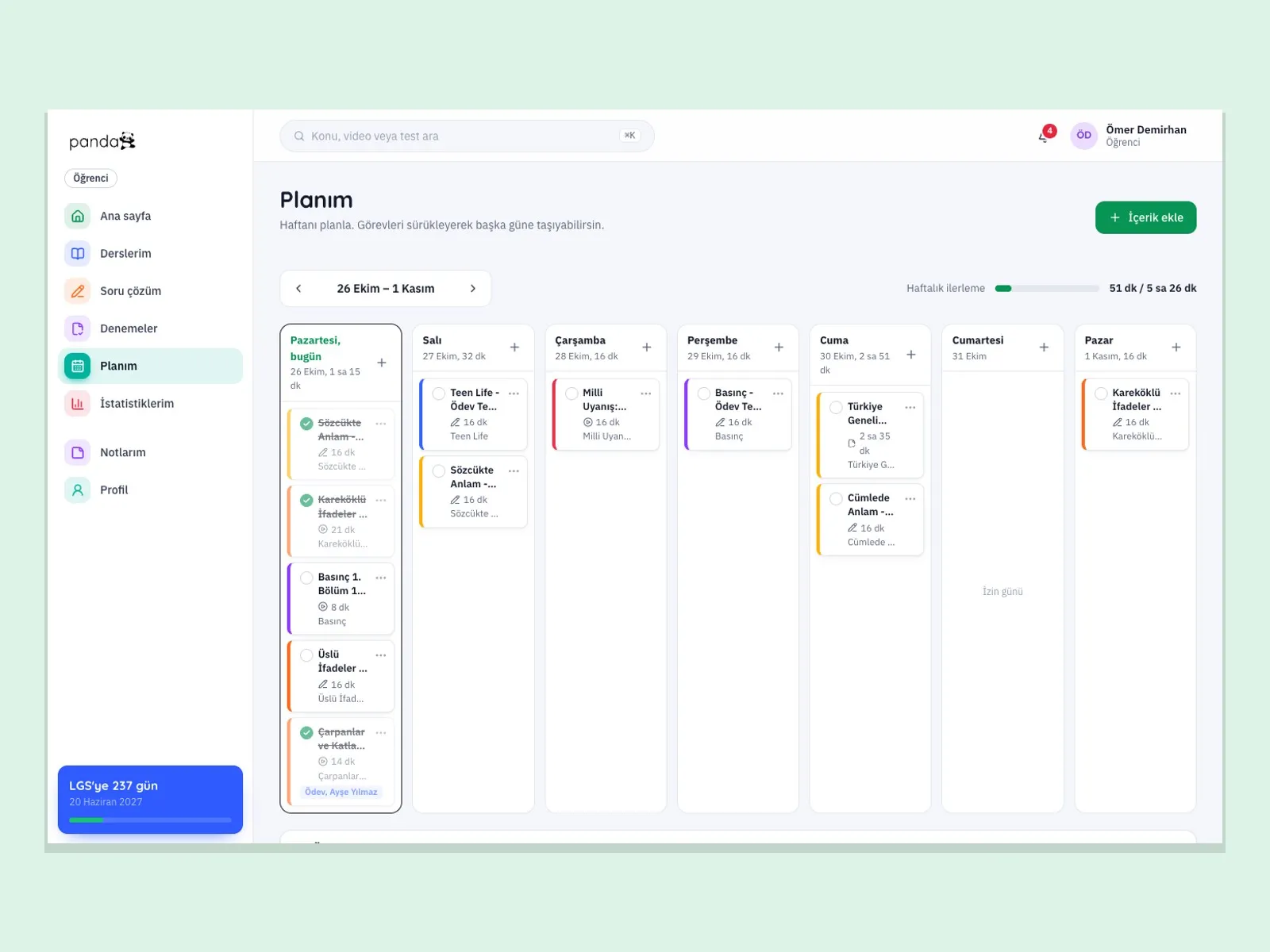
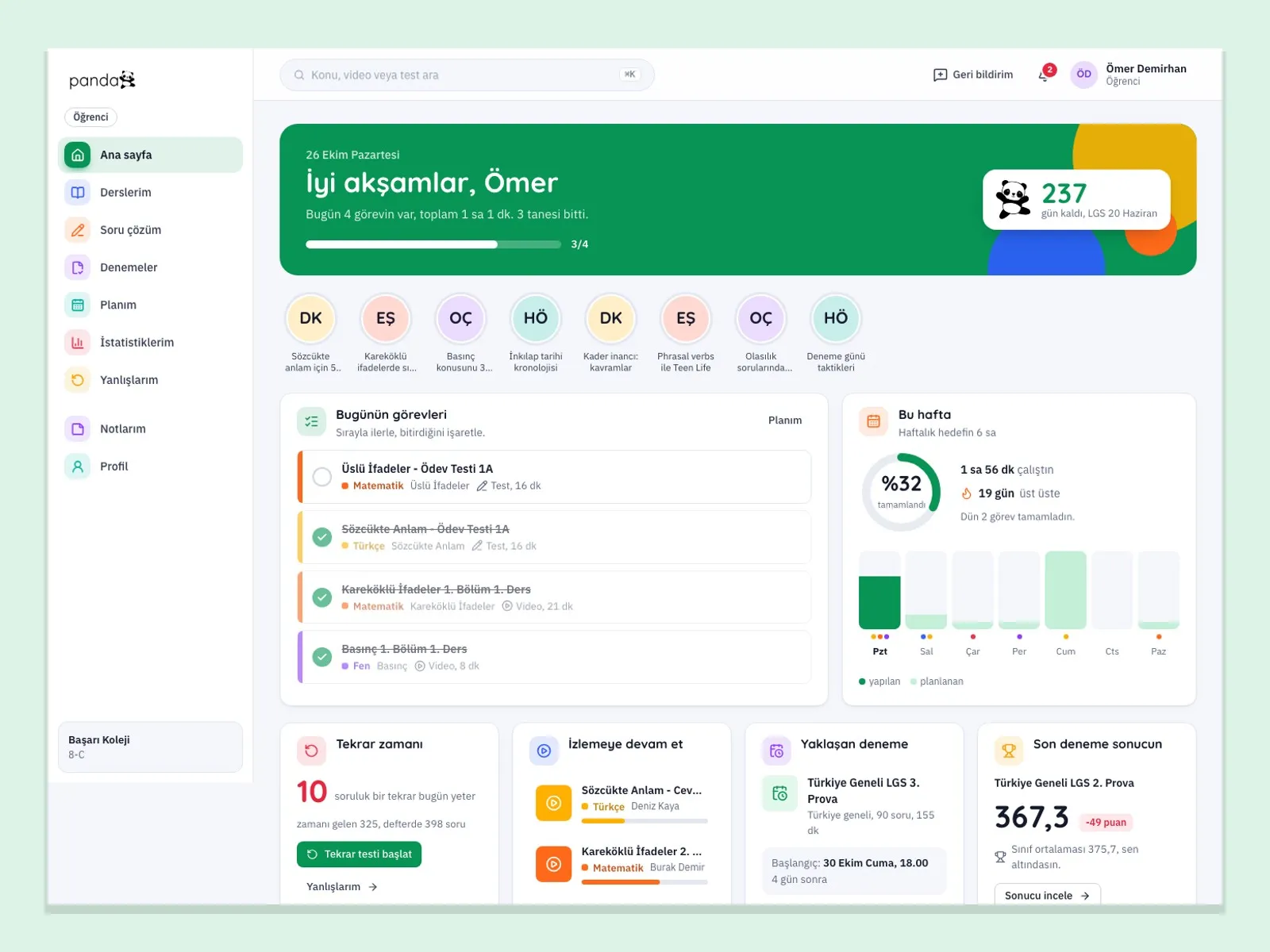
Baykuş student home page: today’s tasks, weekly study time and days left until the LGS
Student studying at home with a laptop and a phone
Teacher giving a lesson in front of the board with students in the classroom
In short

Baykuş is an education platform for 8th-grade students preparing for the LGS (Turkey’s high school entrance exam). It brings video lessons, a question bank, mock exams and a study plan together. There are separate panels for students, teachers, school managers, parents and the platform administrator; schools, prep centers and publishers can run the platform under their own brand.

  • 01

    Each topic follows a fixed order

    Every topic runs in order: section, video, topic test and homework test, so the student always sees where they left off.

  • 02

    Wrong questions come back

    Questions answered wrongly or left blank are asked again after 3, 7 and 14 days; after three correct answers they leave the notebook.

  • 03

    Mock exams go down to the learning outcome

    Next to the net score, LGS score and ranking, it shows the missing learning outcome and the video section that teaches it.

  • 04

    Teachers know who to call

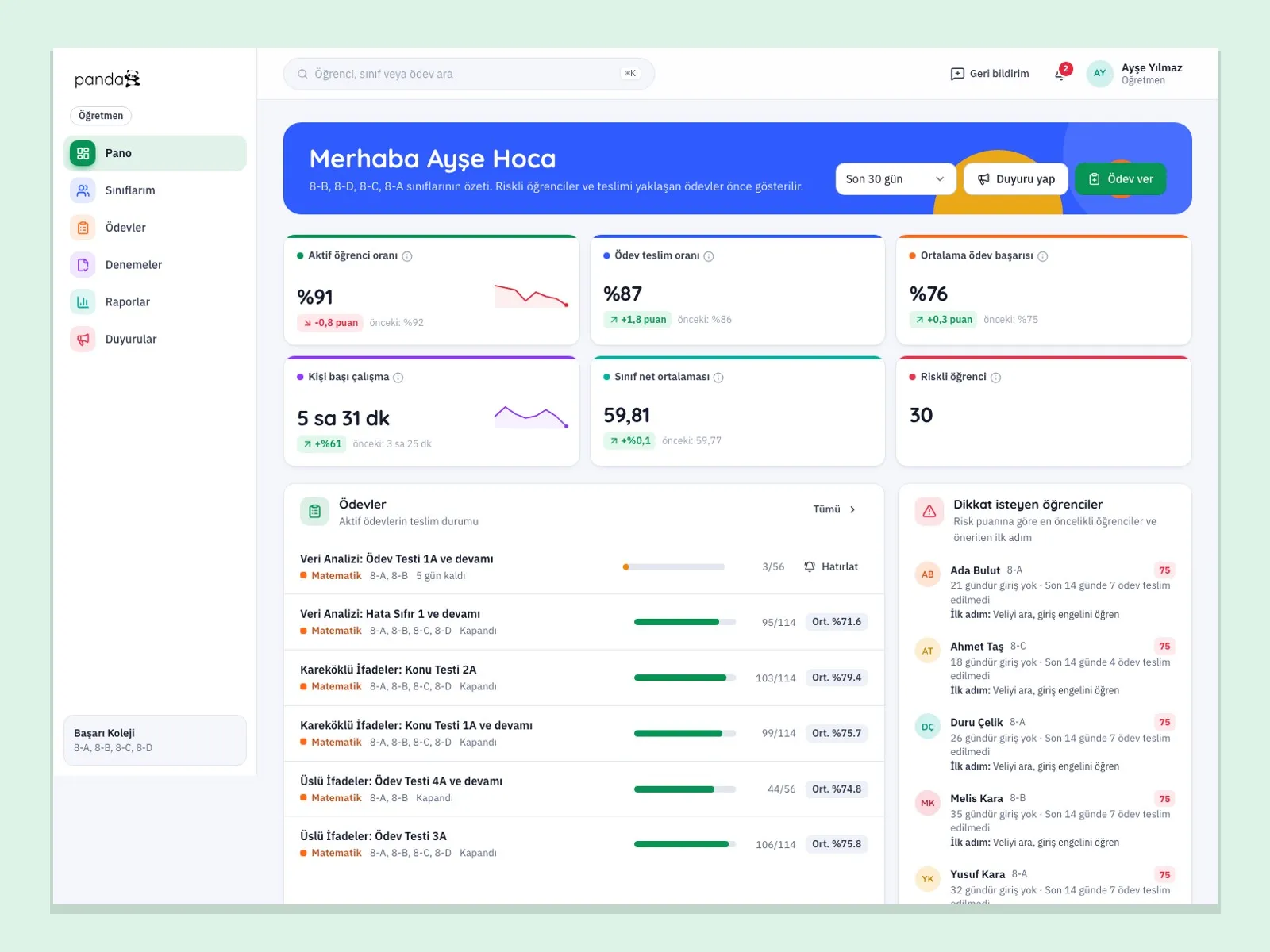
    The class dashboard puts the eight highest-priority students first, ranked by risk score.

What goes wrong most often in LGS preparation?

  • The video freezes, the connection drops

    Long lesson videos stall on a weak connection. In Baykuş the quality adjusts to the connection, and students can also pick the quality themselves.

  • Searching for the answer key

    Finding the answers to a test in a book takes minutes. The student opens the test with a QR code or short code, fills in the answer sheet and sees the result immediately.

  • The plan stays on paper

    A weekly schedule is prepared by hand and is out of date two days later. In Baykuş, homework drops into the student’s plan automatically.

  • A mock exam result is only a net score

    You know how many nets were scored, but not which learning outcome is missing. The result screen ties lost points to topics.

  • Teachers chase the class one by one

    Who did the homework and who fell behind is tracked in a notebook. The dashboard ranks it automatically.

  • Parents are left uninformed

    Parents learn how their child is doing from meeting to meeting. Baykuş sends a weekly summary every Sunday evening.

Scattered study becomes one progress table

Video, tests, mock exams and homework do not stay in separate places; all of it is recorded in the student’s progress record.

Baykuş screens for students, teachers and schools

The images are the platform’s own screens, taken with sample data.

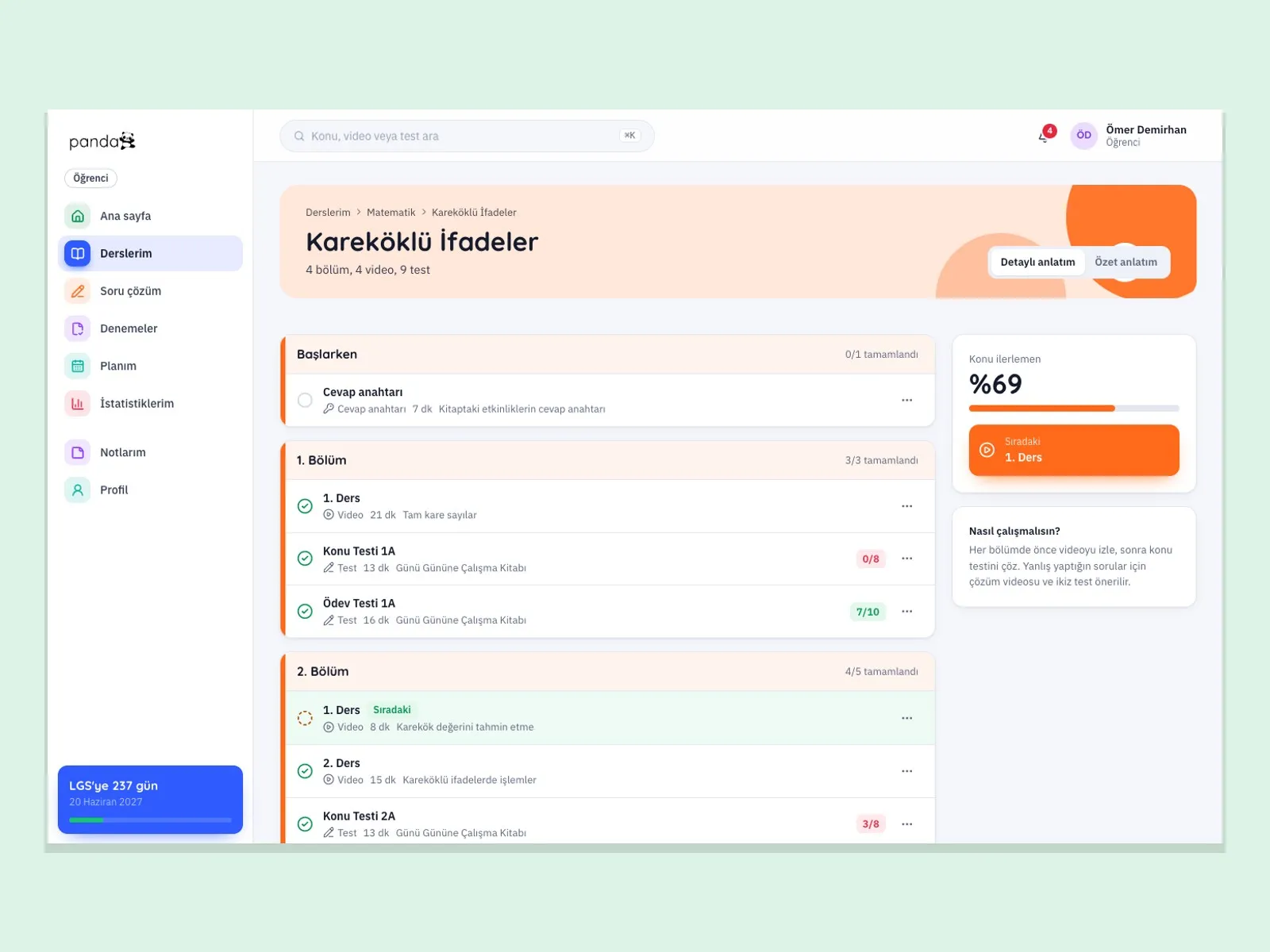
Flow of the Square Root Expressions topic: sections, videos, topic tests and completion rate
Student

Topic flow: video, test and homework in order

Each topic is split into sections. The student watches the lesson, solves the topic test and then moves on to the homework test. The completion rate and the next step are always on screen.

  • Section-by-section progress and completion percentage
  • Topic test and homework test results
  • Detailed and summary explanation options
  • Countdown of days left until the LGS
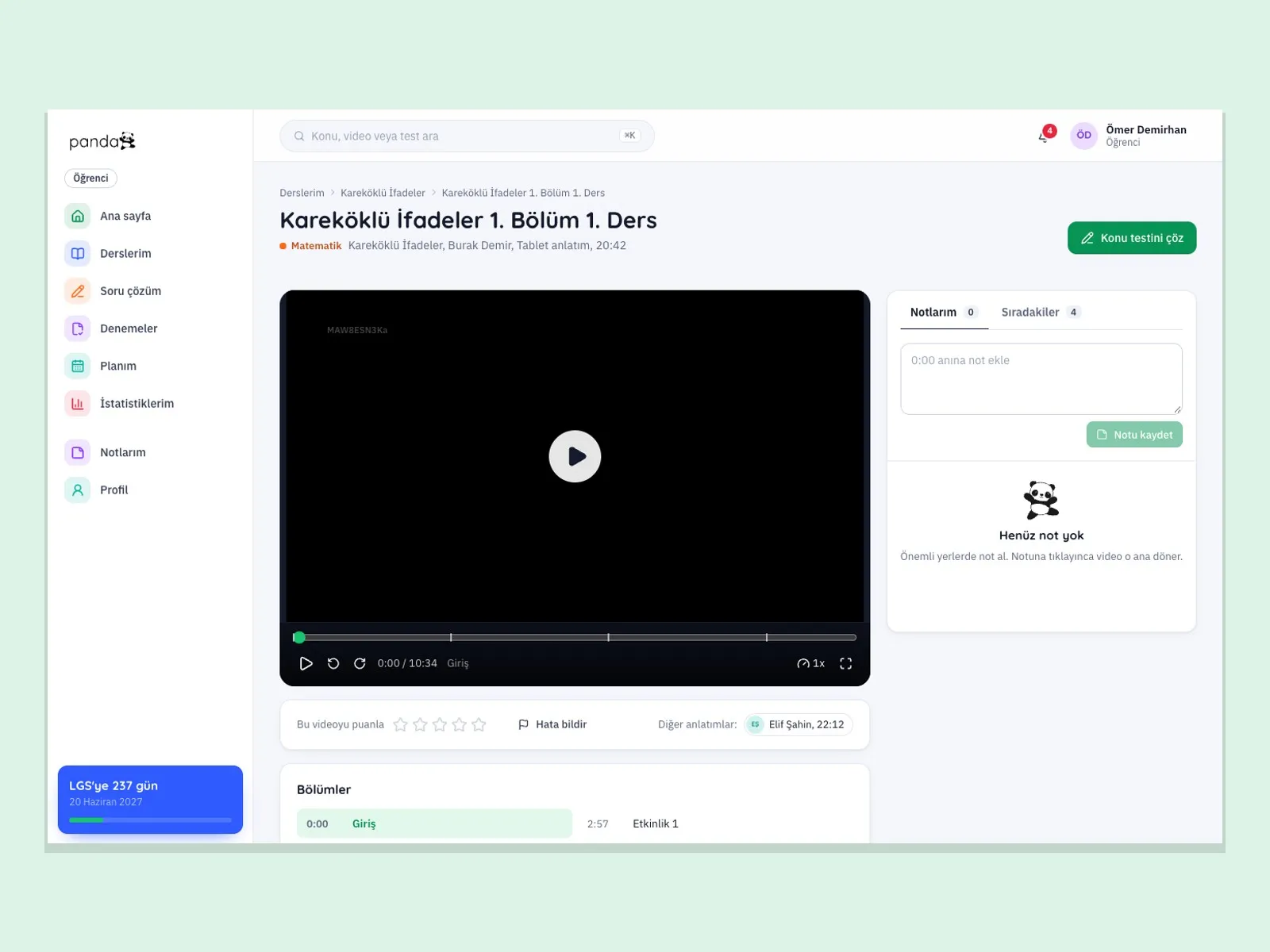
Lesson video screen: player, section list and note-taking panel
Video

Take notes in the lesson video, jump to a section

The video player adjusts quality to the connection. The student changes the speed from 0.5x to 3x, jumps anywhere with section markers, takes timestamped notes and reports faulty content.

  • Quality selection and 0.5x–3x speed
  • Section markers, skip the intro
  • Notes linked to the video
  • One-click jump from the lesson to the topic test
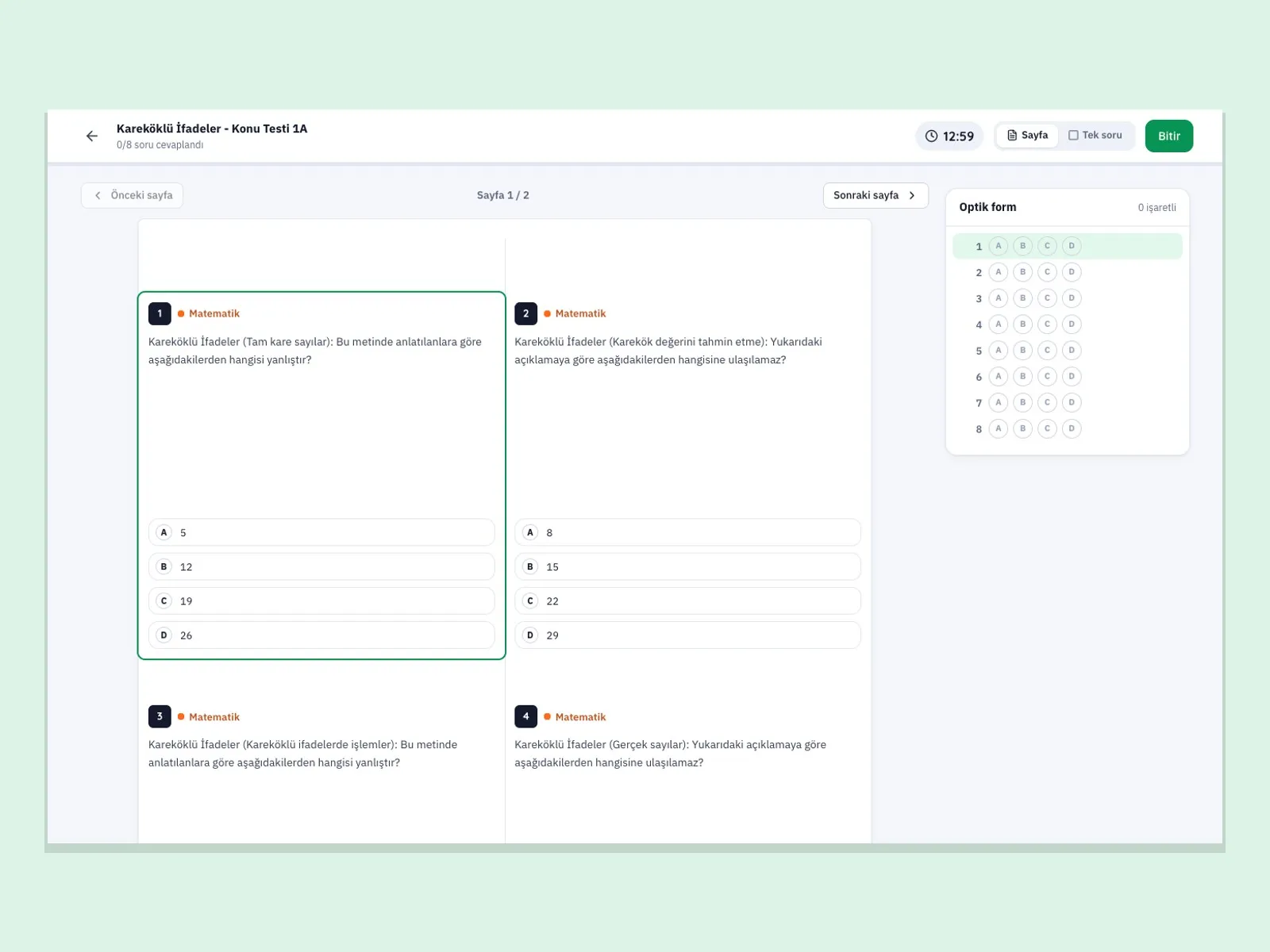
Test screen: four questions, options, timer and the answer sheet beside them
Exam

A test can be solved in three ways: page, single question, answer sheet

The student can solve a test in a book-page view, one question at a time, or with the answer sheet only. The answer key is never sent to the student’s device; grading happens on the server.

  • Page view and single-question view
  • Answer sheet for those solving from the book
  • Timer
  • Open a book test with a QR code or short code
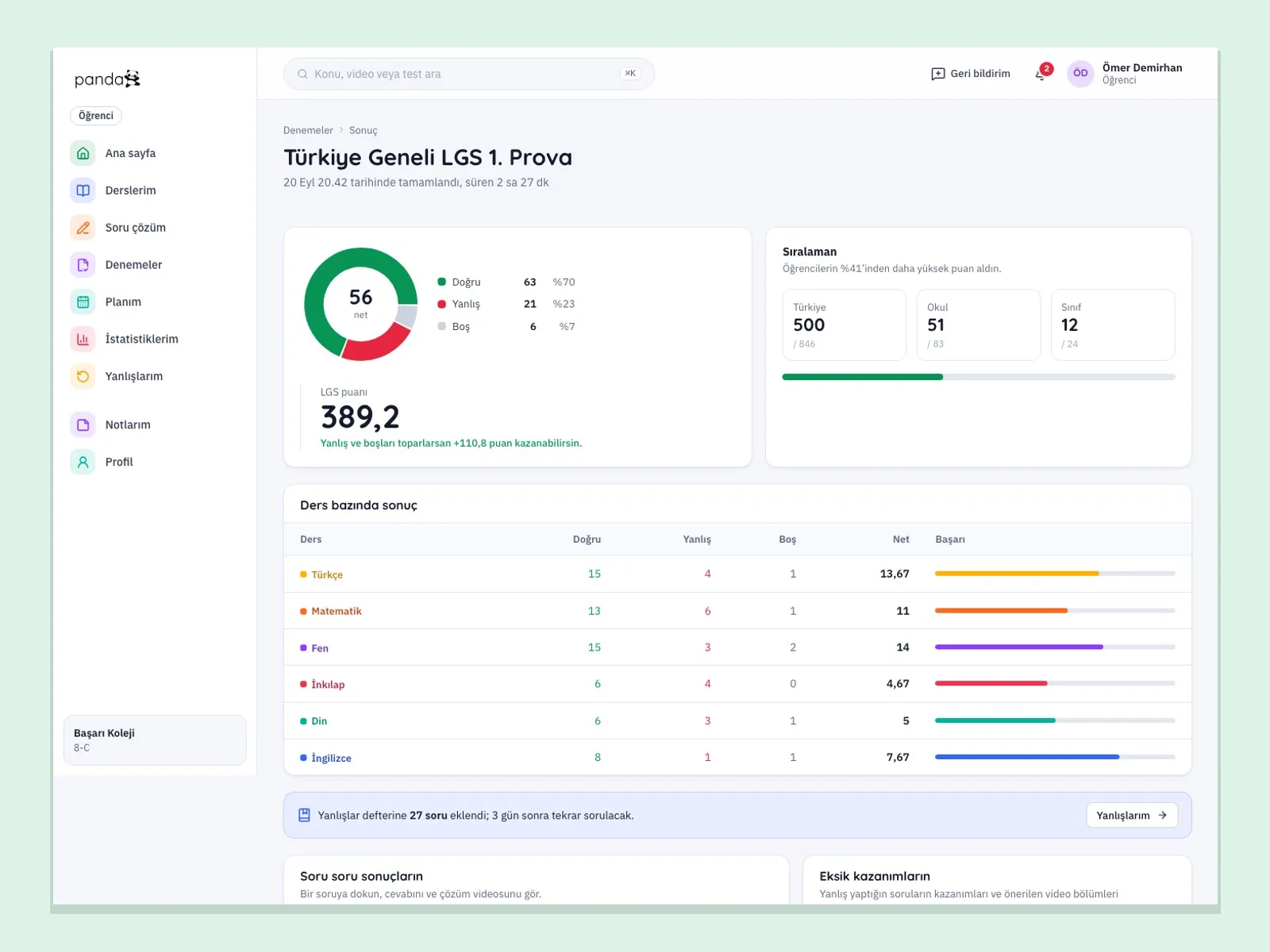
Mock exam result screen: total net score, LGS score, per-subject result table and question map
Result

Mock exam result: net score, points, ranking and missing outcomes

When the mock exam ends, the student sees the net score, the LGS score, and the ranking in Turkey, the school and the class. Lost points are spread across topics, and a video section to watch is suggested for each missing outcome. A “twin test” is generated automatically from the wrong answers.

  • Correct, wrong, blank and net per subject
  • Lost points and list of missing outcomes
  • Suggested video section
  • Twin test from wrong answers
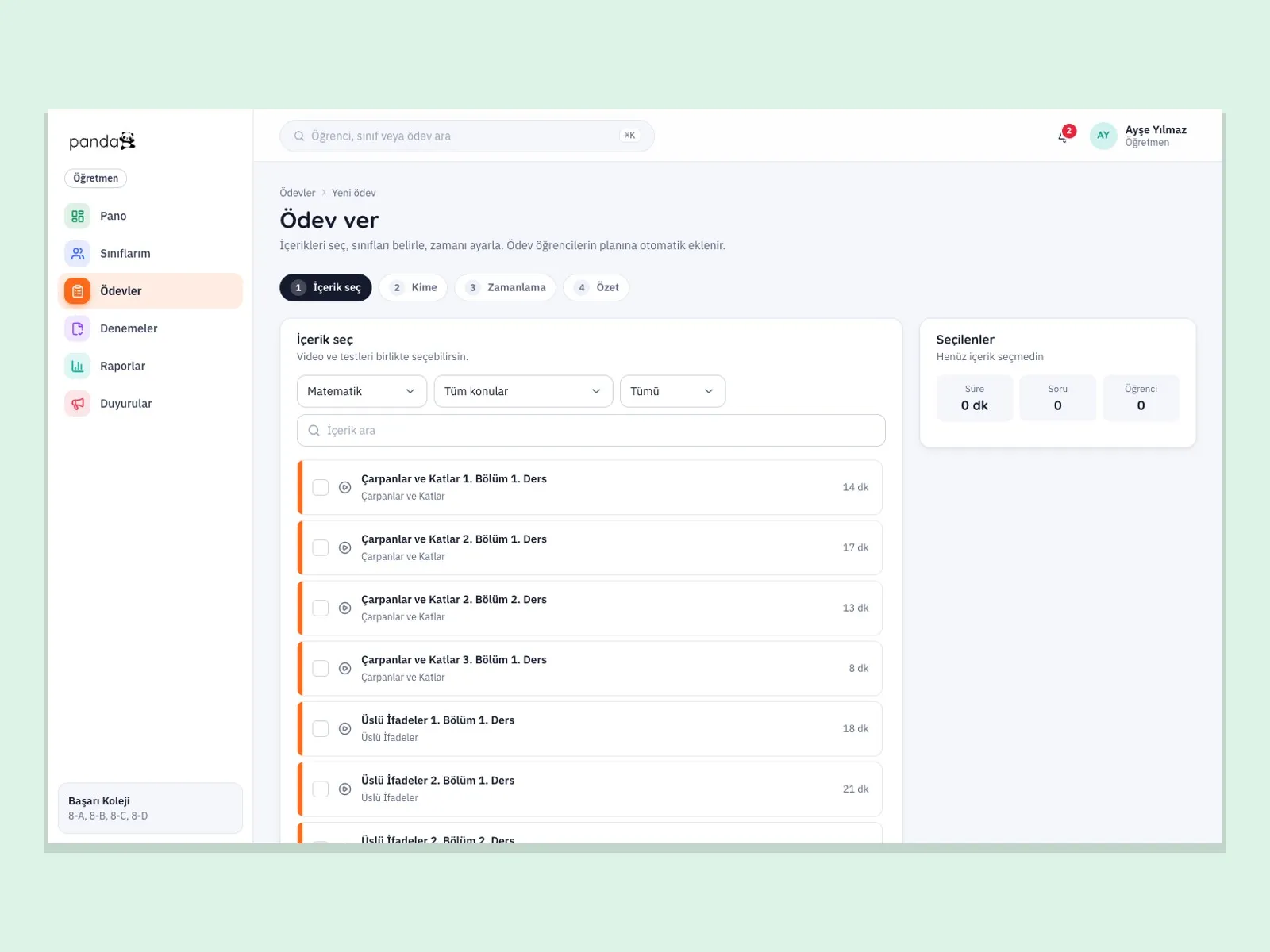
Assign homework screen: four-step wizard, content list and summary of selections
Teacher

Homework is assigned in four steps and lands in the plan automatically

The teacher selects the content, chooses the class or student, sets the timing and confirms the summary. The homework is added to the student’s plan; who did it and who did not shows on the class dashboard.

  • Steps: content, recipients, timing, summary
  • Select videos and tests together
  • Eight priority students on the class dashboard
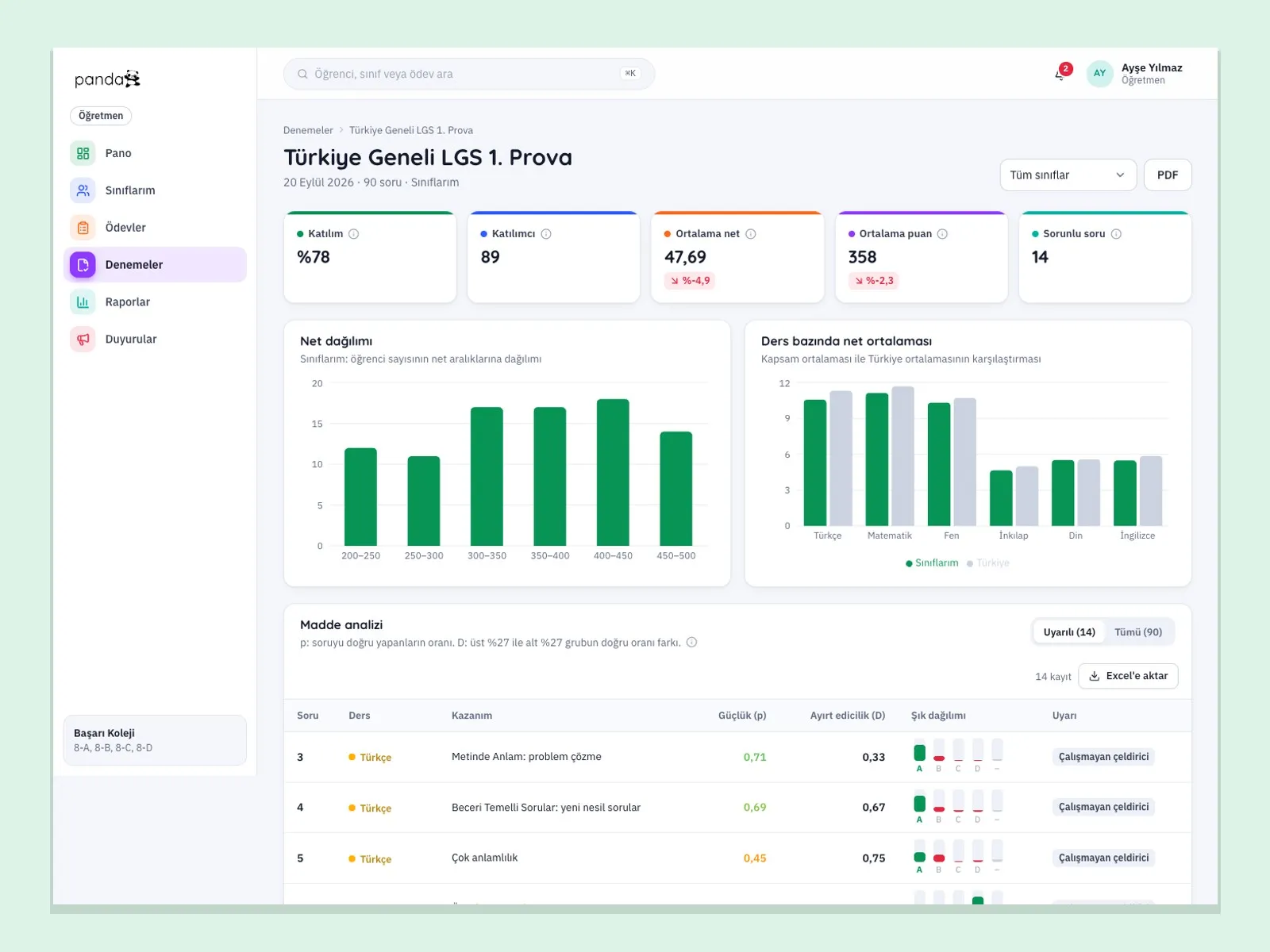
  • Item analysis and student report card for mock exams
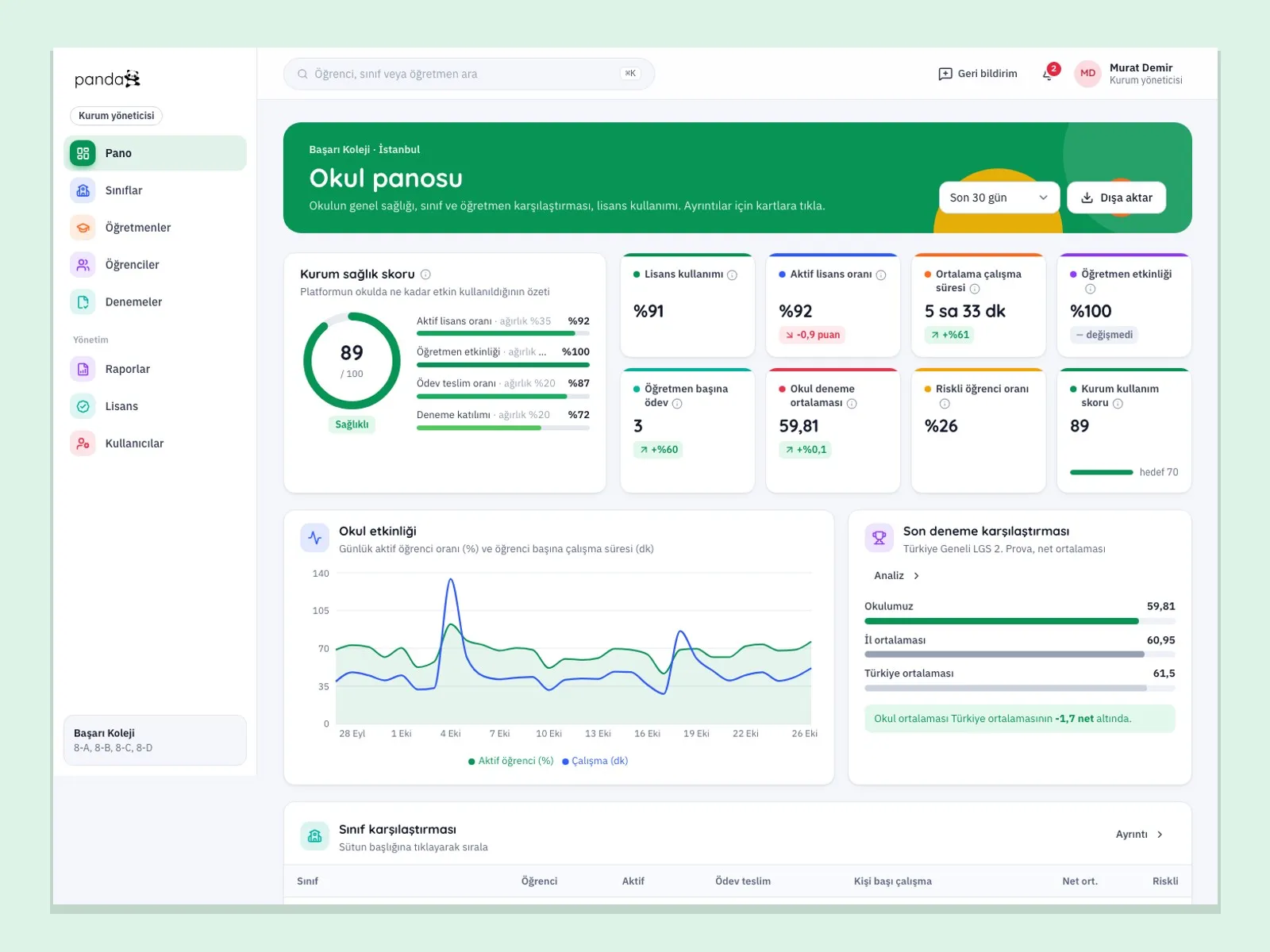
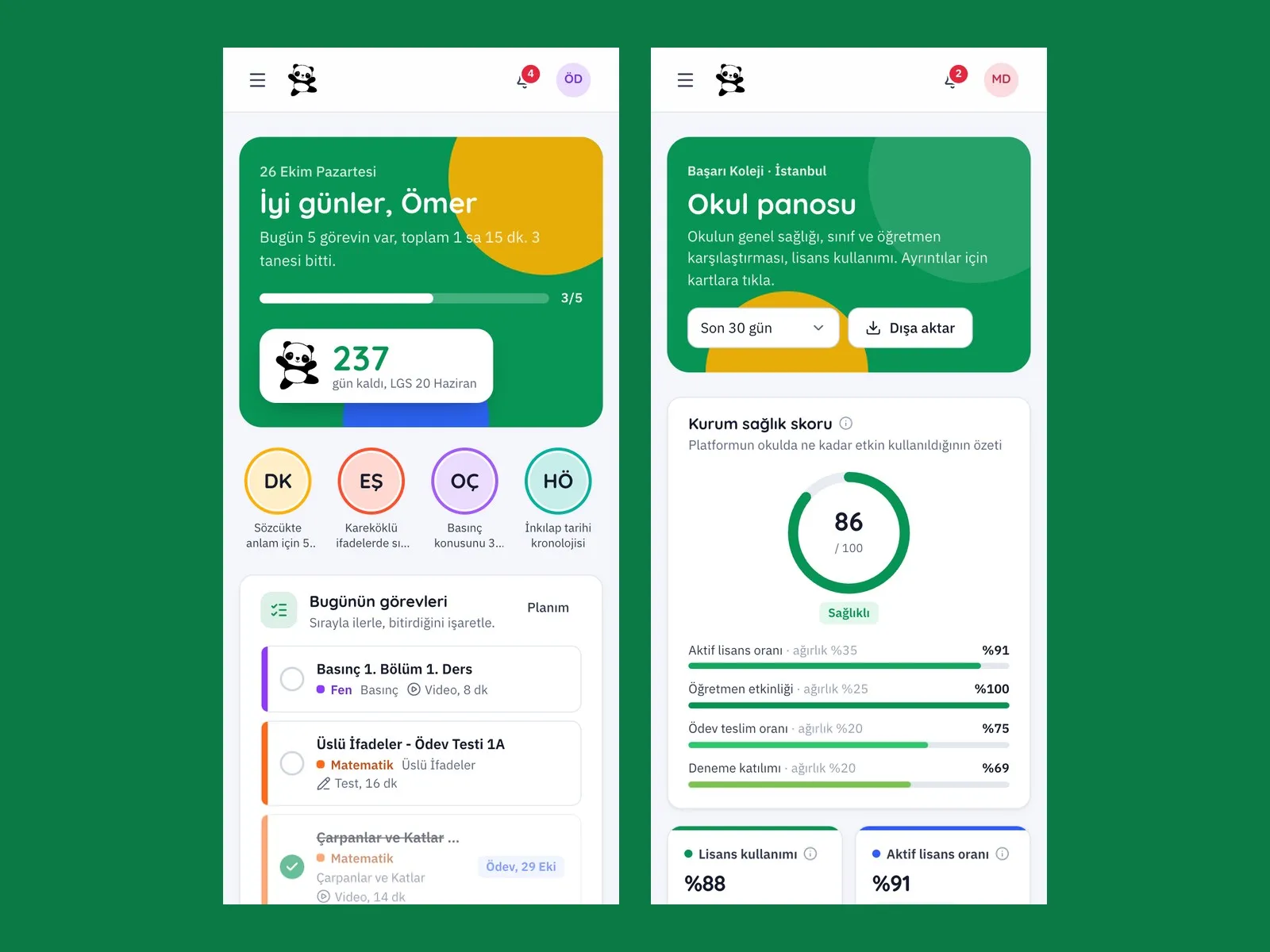
School dashboard: school health score, activity chart, class comparison and student list
School

School dashboard: the school’s status in a single score

The school manager sees the school health score, license usage and a comparison of classes and teachers. Teachers and students are invited one by one or uploaded in bulk with a CSV file.

  • School health score
  • Class and teacher comparison
  • License seats and activation codes
  • Bulk user upload with CSV

See how Baykuş would work in your business

Tell us briefly about your process and we will walk through the screens with your own example.

  • Reply the same business day
  • 15+ years of experience
  • 90 client businesses

How Baykuş differs from preparing with books and notebooks

  1. 01 Checking tests

    Today

    The student looks for the answer key and marks their own mistakes.

    With Baykuş

    They fill in the answer sheet; the result, the mistakes and the solution video arrive immediately.

  2. 02 Wrong questions

    Today

    Mistakes are cut out and pasted into a notebook, and often never opened again.

    With Baykuş

    The mistakes notebook brings the question back after 3, 7 and 14 days by itself.

  3. 03 Study plan

    Today

    The weekly schedule is written on paper and homework is tracked separately.

    With Baykuş

    Homework drops into the plan; it is dragged around in day, week and month views.

  4. 04 Mock exam analysis

    Today

    A result list is posted; which question discriminates well is unknown.

    With Baykuş

    Item analysis gives each question’s difficulty, discrimination and distractor distribution.

  5. 05 Informing parents

    Today

    Done through parent meetings and phone calls.

    With Baykuş

    Done through the parent panel and a weekly summary sent every Sunday.

  6. 06 School reporting

    Today

    Excel files are collected from teachers and merged.

    With Baykuş

    The report center produces ready-made reports, and scheduled reports arrive by email.

How does a school start using Baykuş?

  1. 1

    The school and licenses are defined

    Your school, classes and license seats are created on the platform.

    Setup
  2. 2

    Teachers and students are added

    The school manager invites users one by one or uploads them in bulk with a CSV file.

    Invite
  3. 3

    Users log in with a phone number and a code

    Users do not memorize passwords; they sign in with a one-time code sent to their phone.

    Login
  4. 4

    The teacher assigns homework

    Homework is prepared in four steps and lands in the student’s plan.

    Homework
  5. 5

    The student watches, solves and repeats

    Video, test and mock exam results are recorded in the progress record and the mistakes notebook.

    Study
  6. 6

    Teachers and managers see the result

    Mock exam analysis, class progress and the school dashboard run on current data.

    Tracking
  7. 7

    The parent gets a weekly summary

    The weekly summary is sent to the parent every Sunday evening; details are in the parent panel.

    Parent

What is in Baykuş?

Five panels for five kinds of users, one set of data.

  • Topic flow and video lessons

    A topic structure that moves in order: section, video, topic test and homework test.

  • Question bank and book code

    A test in a printed book opens with a QR code or short code; answers are marked on the answer sheet.

  • Mock exams and result analysis

    Net score, LGS score, ranking, lost points, missing outcomes and the suggested video.

  • Mistakes notebook

    Questions answered wrongly or left blank are asked again with spaced repetition.

  • My plan and study camp schedule

    Day, week and month views; a homework basket and bulk add to the plan.

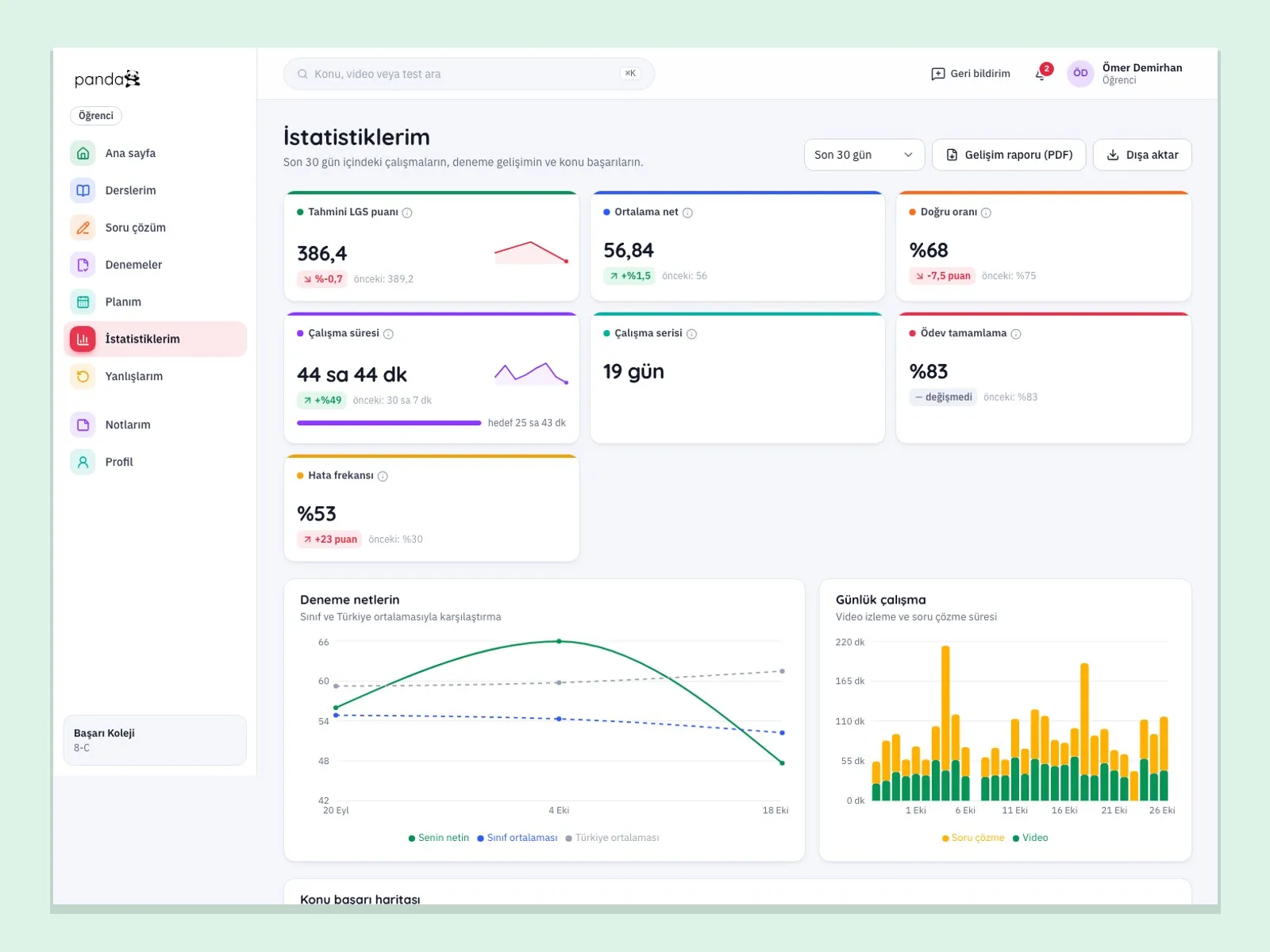
  • Statistics and progress report

    Topic heat map, net score trend and study times; a PDF progress report.

  • Badges, streaks and focus mode

    Points, streaks, leagues and daily tasks; a focus mode with a Pomodoro timer.

  • AI assistant

    Explanation of a wrong question, coach note and plan suggestion; when switched off, rule-based suggestions take over.

  • Class dashboard

    Priority students by risk score, homework completion and class average.

  • Assigning homework

    Homework with steps for content, class or student, timing and summary.

  • Mock exam item analysis

    Difficulty, discrimination and distractor distribution for each question.

  • Student report card and announcements

    PDF student report card, class progress report and class announcements.

  • School dashboard

    School health score, class and teacher comparison.

  • License management

    School seats, activation codes, trial licenses, extension and revocation.

  • Bulk user upload

    Student, teacher and parent lists are imported from a CSV file.

  • Parent panel

    Parents log in by phone and see their child’s summary, mock exams, homework and reports.

  • Report center

    Ready-made reports, a custom report builder, Excel and PDF output, scheduled email reports.

  • Publish under your own brand

    The platform name and brand are changed at setup; the publisher presents it under its own name.

  • Book and edition management

    Books, editions and tests linked to a book are defined; a code is generated for each test.

  • Content workflow

    Content moves through draft, review and publish stages; there is a test editor and a quality screen.

  • Management cockpit

    A detailed view of usage and growth, by school and by user.

  • Support requests

    Users open a request and follow its status; the management side tracks response times.

  • Session security

    One-time code login, a device list with remote sign-out, and an audit log.

What does Panda AI add alongside Baykuş?

For Baykuş, Panda AI takes on these jobs: 24/7 answers to enrolment, fee and timetable questions; Timetable and instructor schedule queries; Instalment and collections tracking.

  1. Today A rep looks in the ERP to check an order’s status With the agent Order and shipping status answered 24/7
  2. Today Out-of-hours messages wait until morning With the agent Hands over what it cannot solve to the right person
  3. Today Complaints can get lost before they are logged With the agent Every request is logged and reported

Jobs it takes on

  • 24/7 answers to enrolment, fee and timetable questions
  • Timetable and instructor schedule queries
  • Instalment and collections tracking
  • Draft updates for parents and students
  • Enrolment and occupancy reports by term

Sample scenario: In the evening a parent asks about the course fee and suitable group times. The agent replies with the current timetable and places available, creates a pre-registration request and passes it to the admissions team.

The agent prepares, a person approves. Anything that posts a record or sends something outside the company goes through your approval.

Explore Panda AI agents

Do you have a question in mind?

Ask our specialist. If it is not the right fit for you, we will say so.

  • Reply the same business day
  • 15+ years of experience
  • 90 client businesses

Frequently asked questions about Baykuş

What is Baykuş?

Baykuş is an education platform that brings video lessons, a question bank, mock exams and a study plan together for 8th-grade students preparing for the LGS. It offers separate panels for students, teachers, school managers and parents. It is developed by Panda Yazılım.

Who can use Baykuş?

Schools, prep centers and course centers can use it with their students and teachers. Publishers can upload their books and videos to the platform and present them under their own brand. Setup is done per institution.

How are tests in printed books solved?

Each test is assigned a QR code and a short code. The student scans or types the code, marks the answers on the answer sheet and sees the result immediately. This way, a test solved from the book also feeds the statistics and the mistakes notebook.

How does the mistakes notebook work?

Questions answered wrongly or left blank are added to the notebook automatically. Baykuş asks these questions again after 3, 7 and 14 days. When the student answers a question correctly three times, it leaves the notebook.

What can parents see?

Parents log in with their phone number and see their child’s summary, mock exam results, homework and reports. A weekly summary is also sent every Sunday evening.

What is AI used for?

AI is used for explaining a wrong question, coach notes, plan suggestions, and summaries for parents, teachers and schools. A school can switch this feature off; in that case the suggestions are rule-based.

Is there a mobile app?

Baykuş is used in a web browser and fits phone screens. Student and parent apps for iOS and Android are in development; contact us for the store release date.

Is Baykuş only for the LGS?

Yes. Today the content structure and score calculation are built for the LGS. Other exams such as the TYT and AYT are not on the platform.

Does the platform have payments or live classes?

No. Baykuş is built on recorded video lessons, tests and mock exams; it has no live class or online payment module. Licenses are defined by school seat or activation code.

See Baykuş with your own data

Describe your process in a few sentences and we will show you the modules that fit.

  • 15+ years of enterprise software experience
  • In the cloud or on your own server
  • Processes compliant with KVKK (Turkey's data protection law)