

Panda E-Commerce

Every marketplace has its own panel, stock is separate in each, and orders are copied every morning

The Marketplace module connects your marketplace stores to the single stock and order record of Panda ERP. Stock and price go to each marketplace from the system, orders land on one list, and cargo and invoices come out of the ERP.

Marketplace
In short

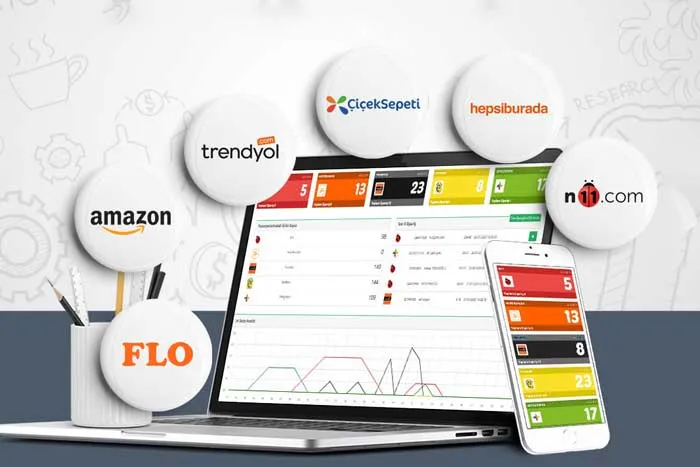
Marketplace is the module of Panda E-Commerce that connects marketplace stores to the stock, order and invoice records of Panda ERP. Orders from marketplaces such as Trendyol, Hepsiburada, N11, Amazon and Çiçeksepeti land on one list; stock, price and category are sent to each marketplace under separate rules. The cargo label and e-invoice come out of the ERP, the tracking number is written back to the marketplace and the settlement is matched with the order.

How is this work done today?

  • Stock is updated separately in every panel

    The stock of the same product is typed into each marketplace panel by hand; a product sold on one stays on sale on another, causing cancellations and lost seller scores.

    1 person × 1 hour / day
  • Orders are copied from panel to ERP

    Every morning each panel is opened and new orders are typed into the ERP; the warehouse picks from paper lists and the cargo label is printed from the panel.

    1 person × 2 hours / day
  • Price and campaigns differ in every panel

    Because commission rates differ, the price is calculated separately on each marketplace; when a campaign period ends, nobody remembers to return to the old price.

    1 person × 3 hours / week

How does Marketplace work?

  1. 1

    Marketplace accounts are connected

    Each marketplace store is introduced to the system with an API key; the ERP product code is matched with the marketplace product code. A list of products that do not match comes back to you.

  2. 2

    Stock, price and category are sent

    Which product is sold on which marketplace, the channel's stock share and the price rule are defined. Changes are made in the ERP and go to all marketplaces from the system.

  3. 3

    Orders land on one list

    Marketplace orders are opened in the ERP, stock is reserved and a picking list goes down to the warehouse. An order that is out of stock or has a missing address goes to a person; the marketplace panel is never opened.

  4. 4

    Cargo, invoice and settlement

    When the package is closed, the cargo label is printed, an e-invoice is issued and the tracking number is written back to the marketplace. When the settlement file arrives, it is matched with the order after commission and deductions.

See how Marketplace would work in your business

Tell us briefly about your process and we will walk through the screens with your own example.

  • Reply the same business day
  • 15+ years of experience
  • 90 client businesses

Marketplace features

Marketplace: Central order list
  • Central order list

    All marketplace orders on one list in the ERP; channel, status and date filters, bulk approval and a bulk work list to the warehouse.

  • One stock, a share per channel

    Stock is kept once in the ERP; the quantity and critical level sent to each marketplace is set by channel, and every channel updates when a sale is made.

  • Per-marketplace price and category

    A price rule by commission rate, special discounts and category mapping for each marketplace; when a campaign ends, the price returns to the old rule by itself.

Marketplace: Product matching
  • Product matching

    ERP product code is matched with the marketplace product code and variant; a new product is opened on all marketplaces from the ERP in one go, and products that do not match are listed.

  • Cargo integration

    The marketplace's contracted carrier or your own carrier; the label is printed from the ERP, and the tracking number is written to the marketplace and the customer by the system.

  • Invoice and settlement matching

    The e-invoice is issued when the order is prepared; the marketplace settlement file is matched with the order after commission and cargo deductions, and differences go to accounting.

  • Returns and cancellations

    A return or cancellation request from the marketplace is matched with the order; an approved return goes back into stock, and invoice cancellation and payment refund are tracked from the same record.

  • Channel report

    Sales, returns, commission and cargo cost by marketplace; product profitability by channel, for any date range, as Excel or PDF.

What does Panda AI add to Marketplace?

The Customer Service Agent is the Panda AI agent that answers order, shipping and invoice questions 24/7 on WhatsApp and e-mail and hands over what it cannot solve to the right person.

  1. Today A rep looks in the ERP to check an order’s status With the agent Order and shipping status answered 24/7
  2. Today Out-of-hours messages wait until morning With the agent Hands over what it cannot solve to the right person
  3. Today Complaints can get lost before they are logged With the agent Every request is logged and reported

Jobs it takes on

  • Order, shipping and invoice queries
  • 24/7 answers on WhatsApp and e-mail
  • Logging requests and handing them to the right person
  • Starting return and complaint processes
  • Frequently asked questions knowledge base
  • Request and satisfaction reports

The agent prepares, a person approves. Anything that posts a record or sends something outside the company goes through your approval.

Explore Panda AI agents

Frequently asked questions about Marketplace

Which marketplaces does it work with?

Ready connections exist for Trendyol, Hepsiburada, N11, Amazon and Çiçeksepeti; each store is introduced to the system with an API key. Even if you have several stores on the same marketplace, each is connected as a separate channel. A request for a new marketplace is assessed together during setup.

How does stock stay the same across all marketplaces?

Stock is held only in the ERP; the quantity to send to each marketplace is set as a share by channel. When a sale is made on one channel, the reserved quantity is reflected to all channels by the system. If a difference is found at the warehouse count, the update is made from one place and nothing is typed into the panels.

Can the price be different on each marketplace?

Yes. A price rule is written for each marketplace by its commission rate; when the list price changes in the ERP, channel prices are calculated by the rule and sent. A special discount is defined for a campaign period, and when the period ends the price returns to the old rule. The e-commerce manager approves price changes.

How do orders go to the warehouse and the carrier?

When an order is opened in the ERP, stock is reserved and the picking list goes down to the warehouse handheld terminal. When the package is closed, the cargo label is printed from the ERP; the marketplace's contracted carrier or your own carrier is selected. The tracking number is written to the marketplace and the customer by the system; the panel is not opened.

How are invoices and settlements matched?

The e-invoice is issued from the same record when the order is prepared and submitted to the tax platform where your country requires it. The settlement file paid by the marketplace is taken into the system, and each order is matched after commission, cargo and return deductions. An unmatched amount goes to accounting as a list, and accounting gives the approval.

How are return and cancellation requests processed?

A return or cancellation request from the marketplace is matched with the order; when an approved return enters the warehouse it increases stock, and invoice cancellation and payment refund are tracked from the same record. A damaged or incomplete return goes to warehouse approval; the decision belongs to customer service and is kept in the audit log.

How is a new product opened on all marketplaces?

The product card is opened in the ERP, the image and description are entered, which marketplaces it will be sold on is marked, and the category mapping is selected per channel. The product is sent to all selected marketplaces in one go. A product that a marketplace is holding for approval or has rejected appears in the list, and the correction is made from the ERP.

What does the agent do on marketplaces?

Stock and price in the marketplace panels are compared continuously with the ERP record; differences are listed the same day and an update draft is prepared. The e-commerce manager approves price changes; the agent does not write prices to a panel on its own or cancel orders. Scenario: stock variance.

See Marketplace with your own data

Describe your process in a few sentences and we will show you the modules that fit.

  • 15+ years of enterprise software experience
  • In the cloud or on your own server
  • Processes compliant with KVKK (Turkey's data protection law)

Last reviewed: · Panda Yazılım product team