For glass cutting businesses

One program for a glass cutting business, from quote to collection

Take the customer’s size list; Panda Cam calculates the price, nests the pieces on the sheet with minimum waste, produces the cutting sheet and machine file, plans delivery, issues the invoice and tracks the collection.

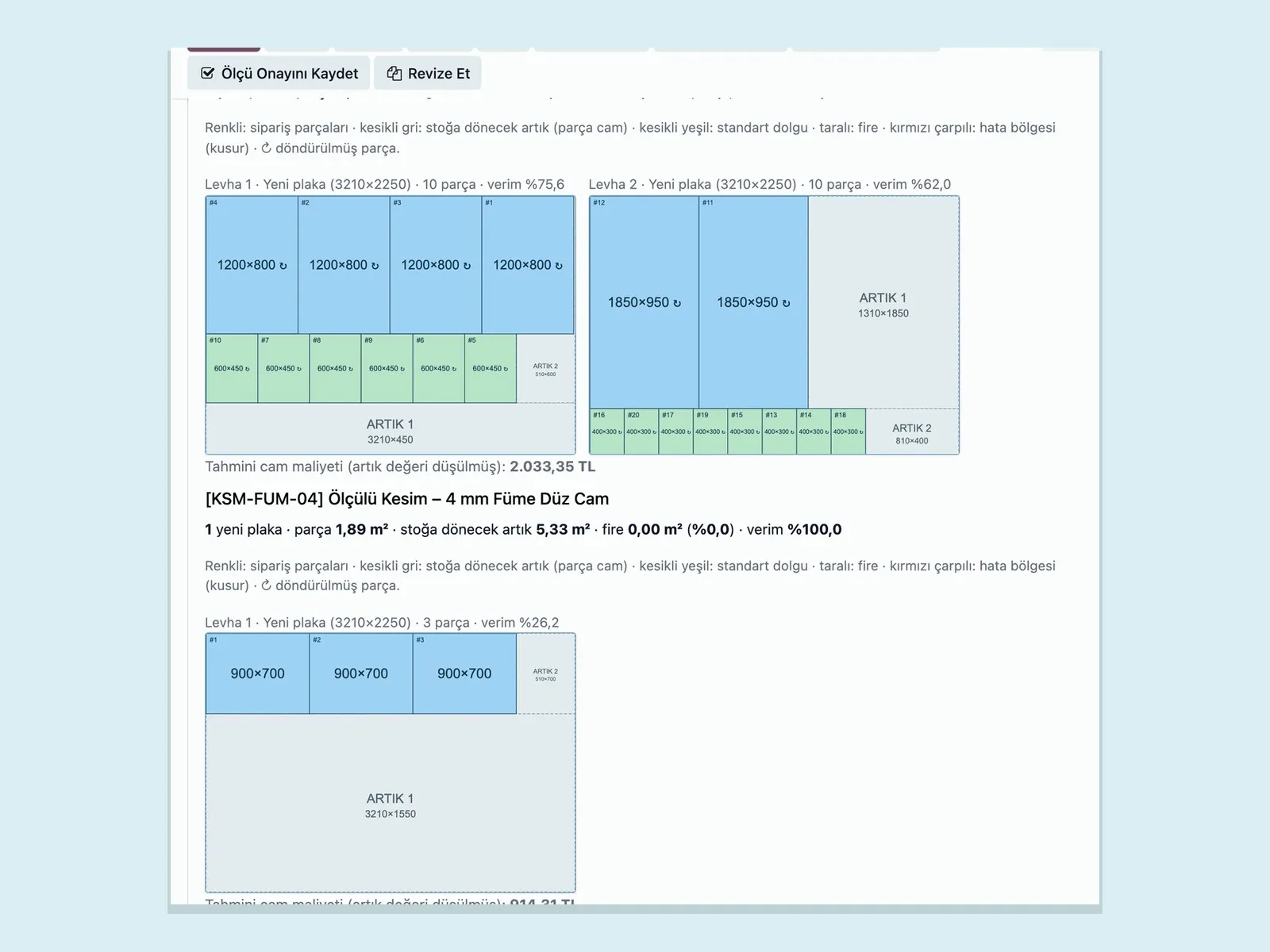
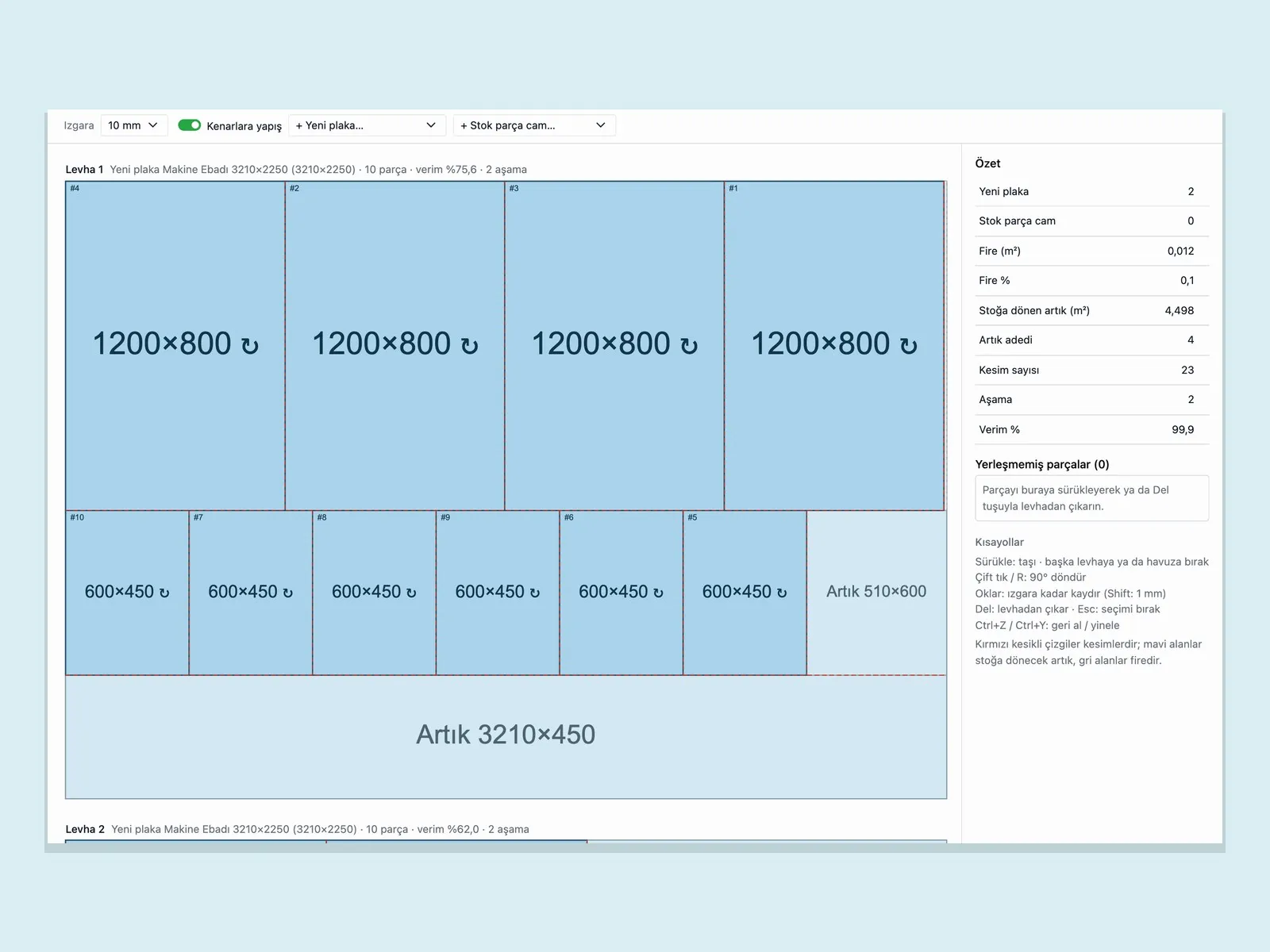
Panda Cam plan editor: glass pieces placed on a 3210×2250 sheet and the offcut that will return to stock
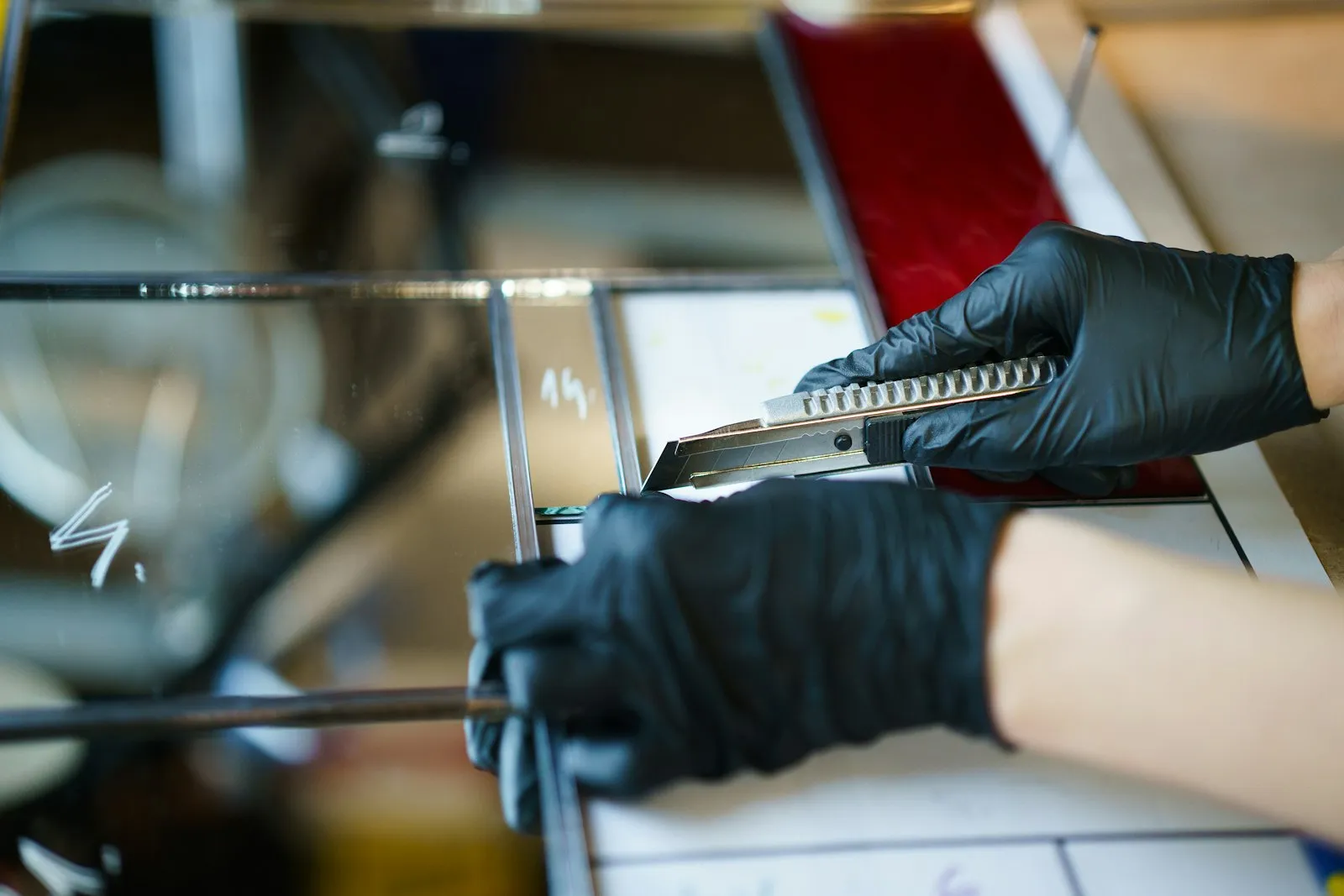
A craftsman in gloves cutting flat glass with a glass cutter
Modern building with a glass facade
In short

Panda Cam is a glass cutting and management program built for businesses that cut and process flat glass. The quote, cutting list, sheet optimization, offcut stock, cutting-shop work orders, delivery, e-Invoice, customer credit risk and collection all move on the same record; sizes are entered once and every later step is generated from that record.

  • 01

    Sizes are entered once

    Width × height × quantity, edge work, holes and shape details are entered in the quote; the cutting plan, sheet, label, waybill and invoice are produced from the same line.

  • 02

    Offcuts are used first

    Before opening a new sheet, the optimization checks the offcuts in stock; usable offcuts from cutting return to stock with a QR label.

  • 03

    Price is calculated by rule

    Base price, campaign, margin, rounding, payment method and freight difference come from a formula; a discount over the limit goes to approval.

  • 04

    A risky customer is caught at the order

    Limit, overdue receivables and cheque status are checked at order approval; delivery stops for a risky customer account.

Where does work get stuck in a glass workshop?

  • Sizes are written in three places

    The customer sends sizes on WhatsApp, the quote is prepared in Excel, and the cutting list is typed again into a separate program. Every copy risks an error.

  • Offcut glass is forgotten on the shelf

    Nobody knows which shelf holds which offcut or what size it is, so a new sheet is opened and usable glass becomes waste.

  • Prices change from one craftsman to the next

    The same glass gets two different prices on the same day. Campaigns, margins and discounts are applied without anyone knowing who approved them.

  • Broken pieces drop out of tracking

    Glass broken in cutting or on the road is cut again, but its cost and cause are not recorded.

  • Delivery and collection sit in separate books

    The job the driver delivered, the invoice issued and the cheque received are not linked; month-end reconciliation takes days.

Scattered requests become one order

Wherever the size list comes from, it lands on the same quote screen; cutting, delivery and invoicing move on that record.

Panda Cam screens from quote to delivery

The images below are the program’s own screens, taken with sample data.

Quote screen with pieces nested on two sheets, yield rate and estimated glass cost
Quote

See how many sheets will be used while you quote

As soon as the cutting list is entered, the program nests the pieces on sheets; the quote screen shows how many new sheets will be opened, how much offcut returns to stock and the estimated glass cost.

  • Bulk size entry via Excel, CSV or paste
  • Edge work (grinding), holes and shaped piece definitions
  • Quote revisions and size approval
  • Cutting list included in the PDF quote sent to the customer
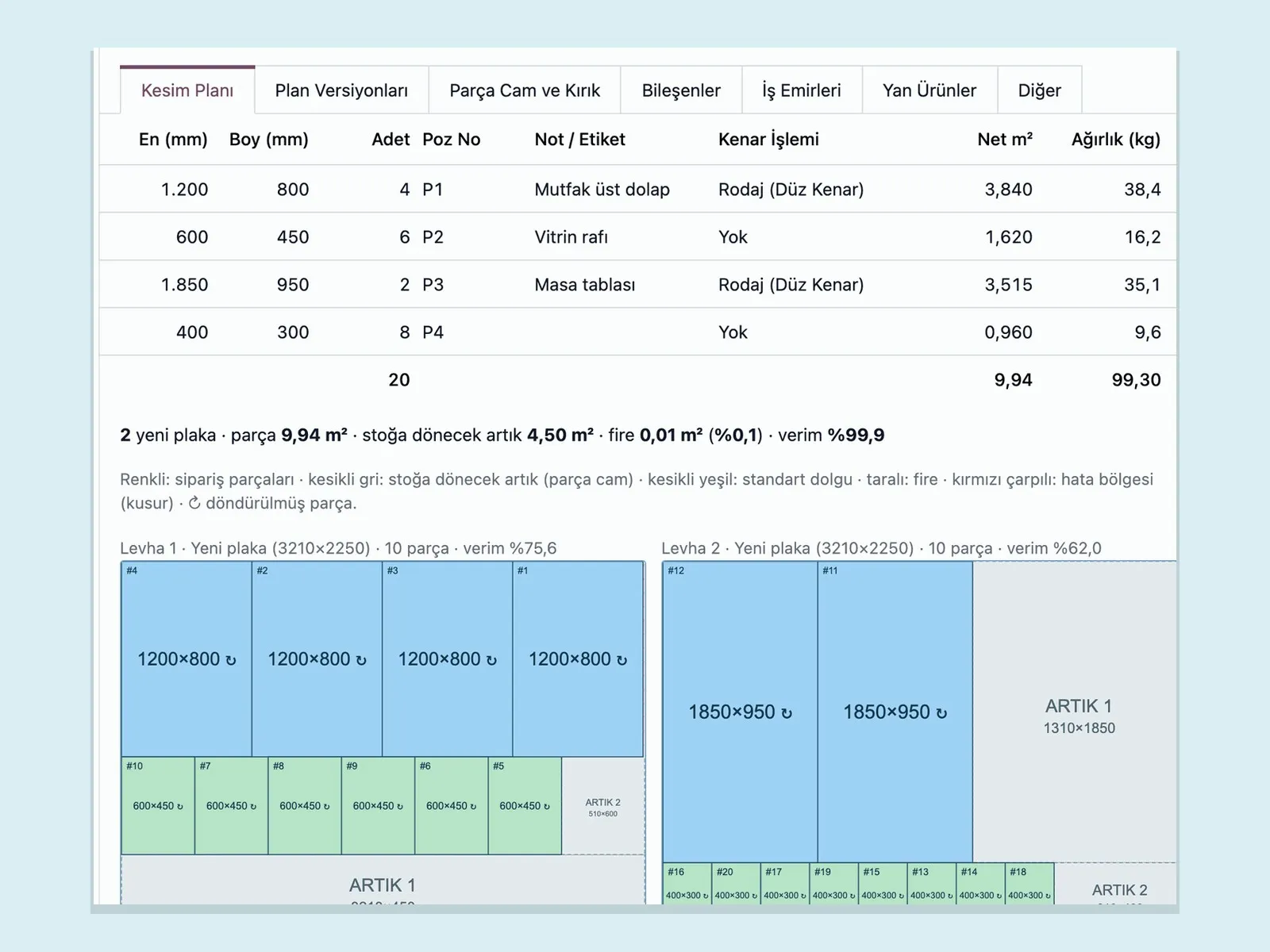
Cutting plan tab: size table, nesting on two sheets, 99.9 percent yield and the offcut returning to stock
Optimization

The cutting plan is built for the fewest sheets, the least waste or the lowest cost

A two-dimensional nesting engine suited to guillotine cutting uses the offcut stock first. You choose the goal: fewest sheets, least waste or lowest cost. The same list always gives the same plan.

  • Sheet scenarios: how many sheets each size would take
  • Decide whether an offcut goes to stock or to waste
  • Drag-and-drop plan editor, 90° rotation
  • Batch cutting of several orders on the same sheet
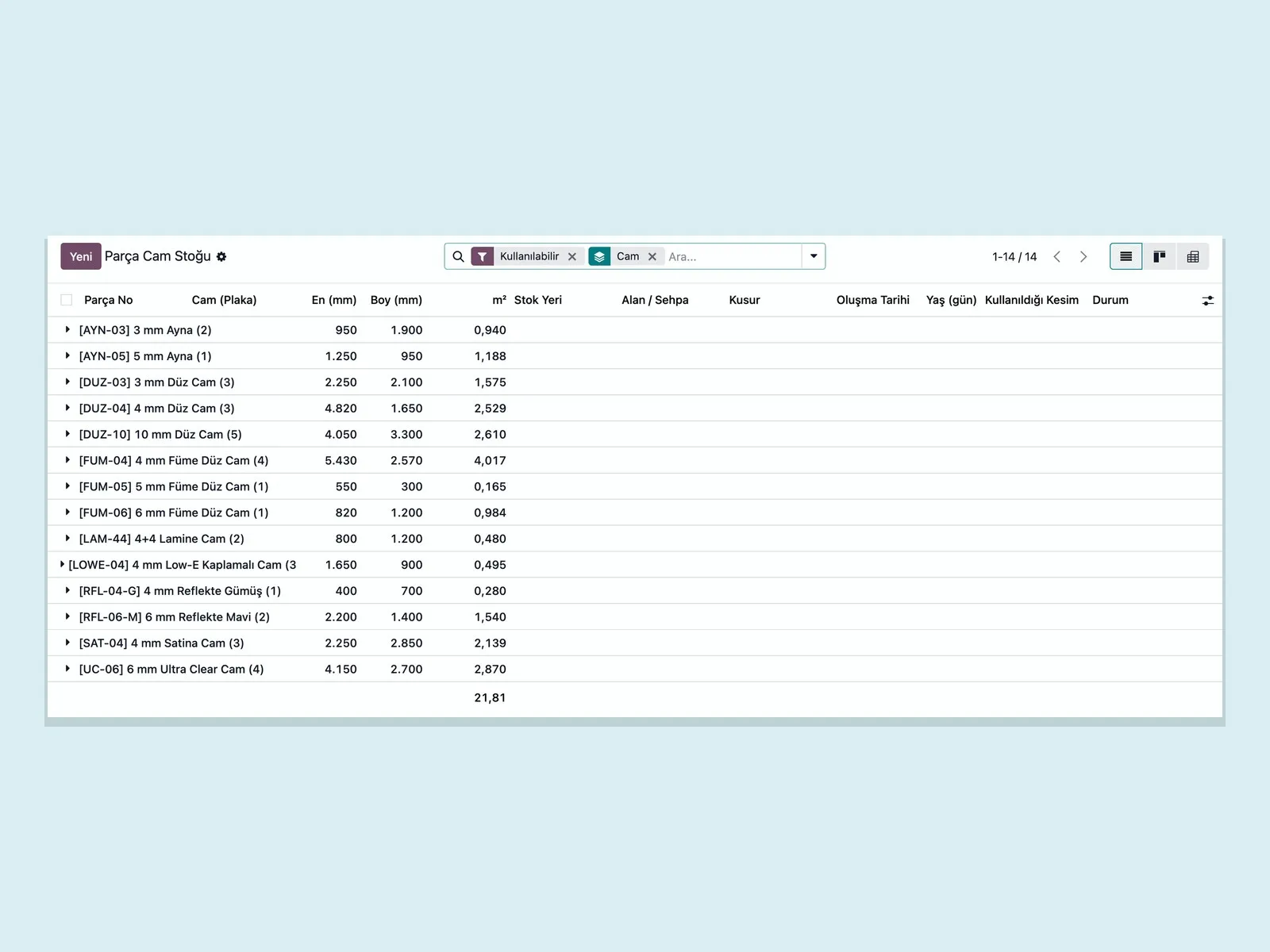
Offcut glass stock list: offcuts grouped by glass type, with width, height and square meters
Offcut glass

Offcuts stay in stock with a QR label

Every usable piece from cutting enters stock with its size, glass type, shelf and age. Defect areas are marked; the next optimization uses the piece by placing parts outside the defect.

  • Offcut card with QR label
  • Filter by glass type and thickness
  • Defect area definition
  • Trace of which cut it was used in
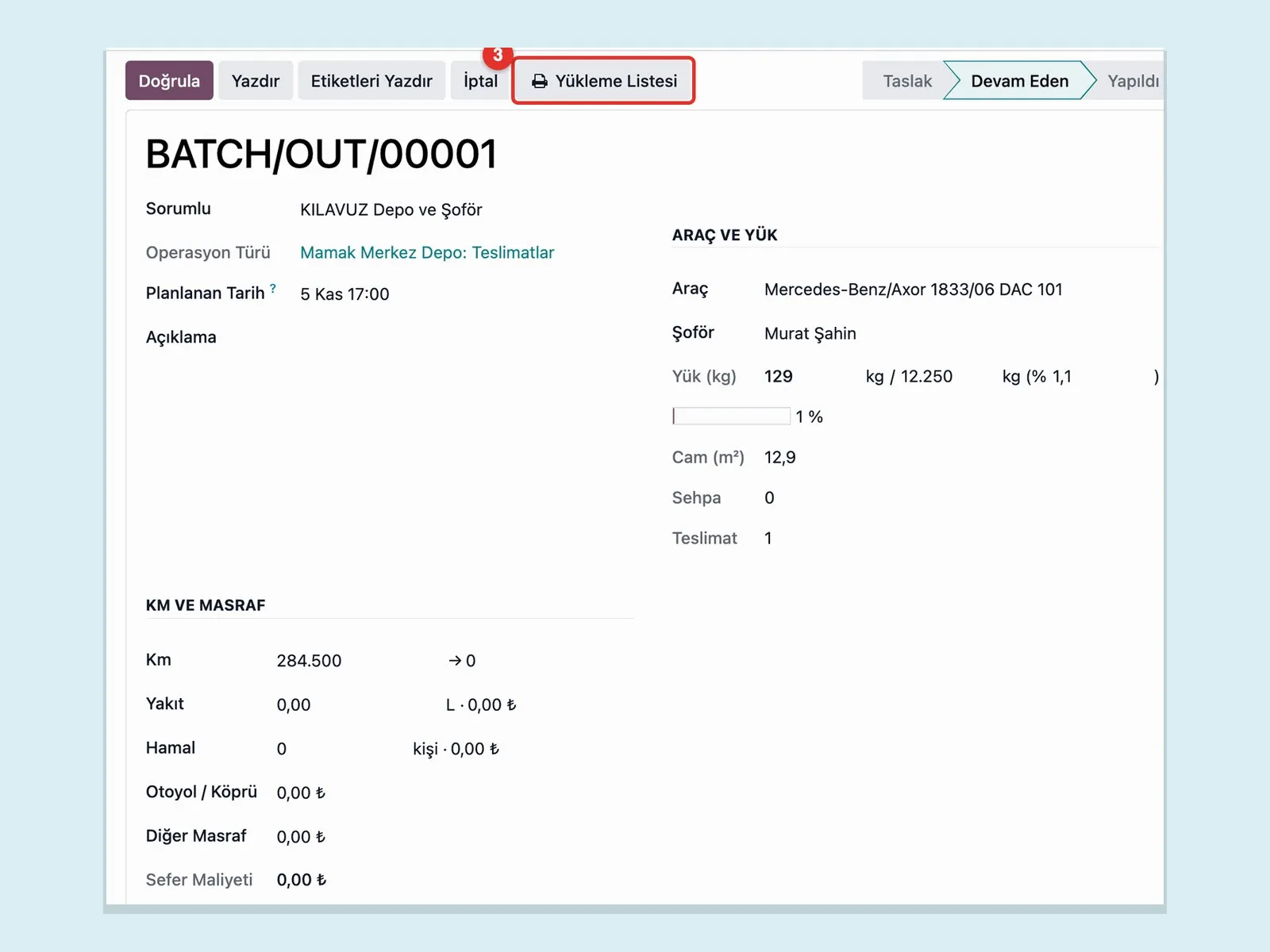
Delivery plan: vehicle, driver, load weight, glass square meters and trip costs
Delivery

Vehicle, rack and driver in one plan

Deliveries are loaded onto vehicles by capacity and the rack arrangement is produced. The driver delivers from their phone: a signature and photo are taken, and missing or damaged deliveries are tied to a report.

  • Vehicle load and square meter capacity
  • Loading list and rack tracking
  • Signature and photo on the driver screen
  • Damage report and re-cut

See how Panda Cam would work in your business

Tell us briefly about your process and we will walk through the screens with your own example.

  • Reply the same business day
  • 15+ years of experience
  • 90 client businesses

How Panda Cam differs from notebooks and Excel

  1. 01 Size entry

    Today

    Sizes from WhatsApp are typed into Excel, then by hand into the cutting program.

    With Panda Cam

    Sizes are entered once in the quote or imported from Excel; the cutting plan comes from the same line.

  2. 02 Price

    Today

    The craftsman looks at the list price and gives the discount off the top of their head.

    With Panda Cam

    The price is calculated by formula; a discount over the limit goes to manager approval.

  3. 03 Offcut glass

    Today

    It sits on the shelf, nobody knows its size, and a new sheet is opened.

    With Panda Cam

    It stays in stock with a QR label; optimization uses it first.

  4. 04 Breakage and re-cuts

    Today

    The piece is cut again and its cost stays invisible.

    With Panda Cam

    It is recorded with the cause of breakage and a re-cut order opens automatically.

  5. 05 Delivery

    Today

    The driver gets the waybill signed and the paper reaches the office in the evening.

    With Panda Cam

    The driver delivers from the phone; the signature and photo land on the order instantly.

  6. 06 Collection

    Today

    Cheques, promissory notes and open accounts are tracked in separate books.

    With Panda Cam

    Customer credit risk, the cheque portfolio and overdue receivables show on the same screen.

How does an order move through Panda Cam?

Seven steps from request to collection; each step uses the record of the one before.

  1. 1

    The size list is received

    The customer’s list enters the quote by hand, from Excel or from a WhatsApp message. Glass type, edge work and holes are defined on the line.

    Request
  2. 2

    Price and sheet scenario are calculated

    The pricing engine calculates the amount; the optimization shows how many sheets will be used and the offcut that returns to stock.

    Price
  3. 3

    The order is approved and risk is checked

    The customer approves the sizes. If the customer has a credit limit issue or overdue debt, the order goes to the manager.

    Approval
  4. 4

    Cutting plan, machine file and labels are produced

    The cutting order opens; the cutting sheet, piece labels and the machine file for the cutting table are generated.

    Plan
  5. 5

    Cutting is done and the offcut is decided

    The operator completes the cutting; broken pieces go back to cutting, usable offcuts go to stock.

    Cutting
  6. 6

    The vehicle is loaded and the driver delivers

    The vehicle leaves with the rack arrangement and loading list; delivery is closed with a signature and photo.

    Delivery
  7. 7

    e-Invoice is issued and collection is tracked

    The e-invoice or B2C e-receipt is produced from the order; collections, cheques and bank movements are posted to the customer account.

    Invoice

Panda Cam modules

The office, cutting shop, delivery and accounting of a glass business in the same program.

  • Quote with a cutting list

    Line-by-line quote with width × height × quantity, position number, notes and edge work; revision history is kept.

  • Pricing engine

    Base price × (1 − campaign) × (1 + margin) formula, rounding rule, payment method and freight difference are defined.

  • Discount approval

    A discount above the set rate is not posted to the quote without manager approval.

  • Counter sale

    Quick sale for a walk-in customer: enter the size, get the price, open the cutting order.

  • Excel and DXF import

    The customer list is imported via Excel, CSV or paste; shaped pieces are read from a DXF drawing.

  • Cutting optimization

    Two-dimensional nesting suited to guillotine cutting; the goal is chosen as fewest sheets, least waste or lowest cost.

  • Plan editor

    Pieces are moved and rotated by drag and drop; the plan is saved as a new version.

  • Offcut glass stock

    Offcuts are tracked with a QR label, shelf location and defect area; optimization uses them first.

  • Cutting order and sheet

    The cutting order, work orders and a cutting sheet with drawings open automatically from the order.

  • Machine files

    Machine files for Intermac and Aktaş cutting tables, DXF output and a PerfectCut import file are produced.

  • Breakage and re-cuts

    A broken piece is recorded with its cause; the re-cut order and its cost are tied to the order.

  • Subcontract tracking

    Work done outside is tracked with send and return records.

  • Delivery plan

    Deliveries are assigned to vehicles by capacity and route; a loading list is printed.

  • Rack tracking

    Which rack is with which customer and for how long; racks waiting to be returned are listed.

  • Driver screen

    The driver sees the trip list on the phone, takes a signature and photo at delivery, and reports damage.

  • Electronic delivery note

    The electronic delivery note is produced from the delivery and sent through the e-document provider.

  • Customer credit risk

    Credit limit, overdue receivables and payment promises sit on the customer card; the risky customer list updates daily.

  • Cheques and promissory notes

    Cheques in portfolio, at the bank and endorsed are tracked with their due dates.

  • Cash, POS and bank

    End-of-day cash closing, POS collection and bank statement matching on the same screen.

  • e-Invoice and e-receipt

    Invoices are produced from the order and sent through the Uyumsoft or e-Logo provider.

  • Profitability report

    Sales, cost and waste are seen together by order, customer and glass type.

  • WhatsApp lines

    The business’s WhatsApp line is connected by QR; quotes, size approvals and customer statements are sent from there.

  • Quote from a message

    Sizes the customer types turn into a draft quote; the customer approves the sizes by writing “ONAYLIYORUM” (“I approve”).

  • AI assistants

    Reading a size list from a photo and a Q&A assistant for managers are optional and switched off by default.

  • Management dashboard

    Collections, cash and bank, sales, square meters cut, waste rate and offcut stock can be followed from a phone too.

  • Permissions and audit

    Four roles, two-step login, a deletion log and KVKK (Turkey’s data protection law) explicit-consent tracking.

What does Panda AI add alongside Panda Cam?

For Panda Cam, Panda AI takes on these jobs: Delivery date and production status queries per order; Material availability check for work orders; End-of-shift summary of output, scrap and downtime.

  1. Today The plan is kept in Excel and the ERP is updated afterwards With the agent The delivery date of any order with one question
  2. Today A material shortage is discovered when the line stops With the agent Material availability check for work orders
  3. Today Three people are asked for one delivery date With the agent Orders at risk of delay are flagged in advance

Jobs it takes on

  • Delivery date and production status queries per order
  • Material availability check for work orders
  • End-of-shift summary of output, scrap and downtime
  • Draft requests to purchasing
  • Daily production briefing for management

Sample scenario: A sales rep forwards a customer’s delivery date question to the agent over WhatsApp. The agent checks the order’s work order, the material status and the line plan, then replies with the estimated delivery date and any risk. The rep gets back to the customer without having to ring production.

The agent prepares, a person approves. Anything that posts a record or sends something outside the company goes through your approval.

Explore Panda AI agents

Do you have a question in mind?

Ask our specialist. If it is not the right fit for you, we will say so.

  • Reply the same business day
  • 15+ years of experience
  • 90 client businesses

Frequently asked questions about Panda Cam

What is Panda Cam and who is it for?

Panda Cam is software that brings quoting, cutting optimization, offcut stock, delivery, e-Invoice and collection into one program for businesses that cut and process flat glass. It suits glass wholesalers, cutting workshops, businesses that process mirror and furniture glass, and businesses that cut for frame and facade manufacturers.

How does cutting optimization work?

The program nests the pieces on the cutting list onto sheets in a way that suits guillotine cutting. It tries the offcuts in stock first and opens a new sheet only if they are not enough. You choose the goal as fewest sheets, least waste or lowest cost, and you can edit the result by hand in the plan editor.

Which cutting tables does it work with?

Panda Cam produces machine files for Intermac and Aktaş cutting tables, as well as DXF output and a PerfectCut import file. The file format is tested on your own table during setup before it goes live. If you use a different table, get in touch and we will look at the file format together.

How are offcut glass pieces tracked?

Usable pieces from cutting enter stock with their size, glass type and shelf location, and a QR label is printed. In later cuts the optimization uses these pieces first. Defect areas such as scratches or chips are marked, and nesting avoids those areas.

Can I issue e-Invoices and electronic delivery notes?

Yes. e-Invoice, B2C e-receipt and electronic delivery note are produced from the order and sent through the Uyumsoft or e-Logo provider. Your provider account is connected to the program during setup.

Can customers place orders on WhatsApp?

Your business’s WhatsApp line is connected to the program. Sizes the customer types turn into a draft quote, the quote and size approval are sent from the same line, and when the customer writes “ONAYLIYORUM” (“I approve”) the approval is posted to the order. If WhatsApp does not reach the customer, an SMS can be sent.

Does it cover insulated glass and tempering?

Today Panda Cam covers flat glass cutting, edge work, holes and shaped cutting. Insulated glass line and tempering furnace planning are not in the program; these operations can be tracked with subcontract tracking.

What infrastructure does it run on, and can it be used from a phone?

Panda Cam is a web-based program running on Odoo infrastructure and is used from a browser. The driver delivery screen and the management dashboard are designed for phone screens. You do not need to install a separate mobile app.

How is setup done?

First your glass types, sheet sizes, pricing rules and customer list are loaded into the program. Then the cutting table file and the e-Invoice provider are connected, and the team is trained for its own role. The duration depends on the size of the business; get in touch and we will plan it for you.

See Panda Cam with your own data

Describe your process in a few sentences and we will show you the modules that fit.

  • 15+ years of enterprise software experience
  • In the cloud or on your own server
  • Processes compliant with KVKK (Turkey's data protection law)