B2B sourcing and procurement platform

Put your sourcing and procurement on autopilot with AI

An end to RFQs lost in the inbox, Excel calculation errors and late supplier orders. In manufacturing, raw materials, spare parts and wholesale trade, every process from collecting quotes to delivered cost sits under one roof.

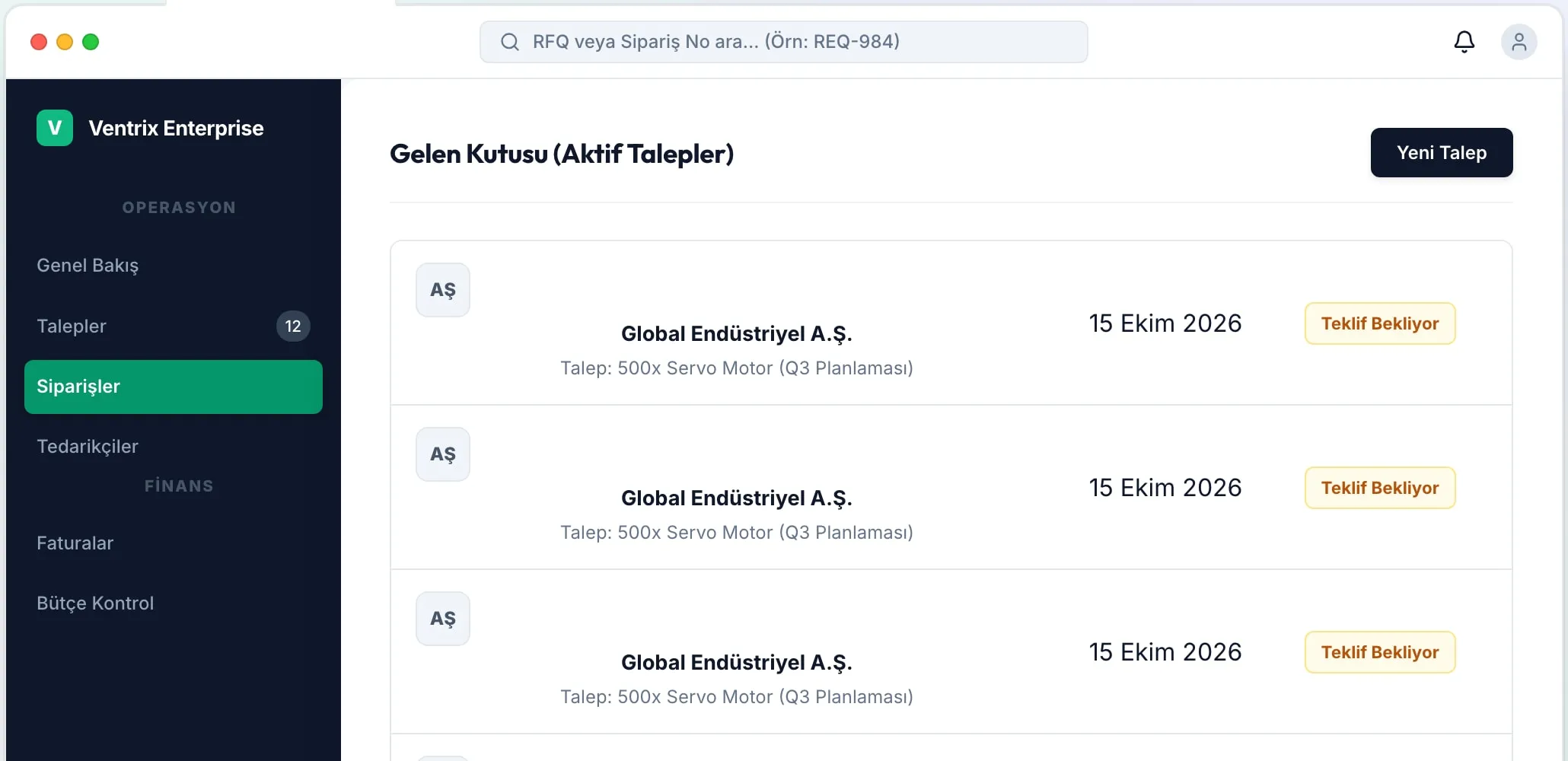
Ventrix inbox: active requests and quote status
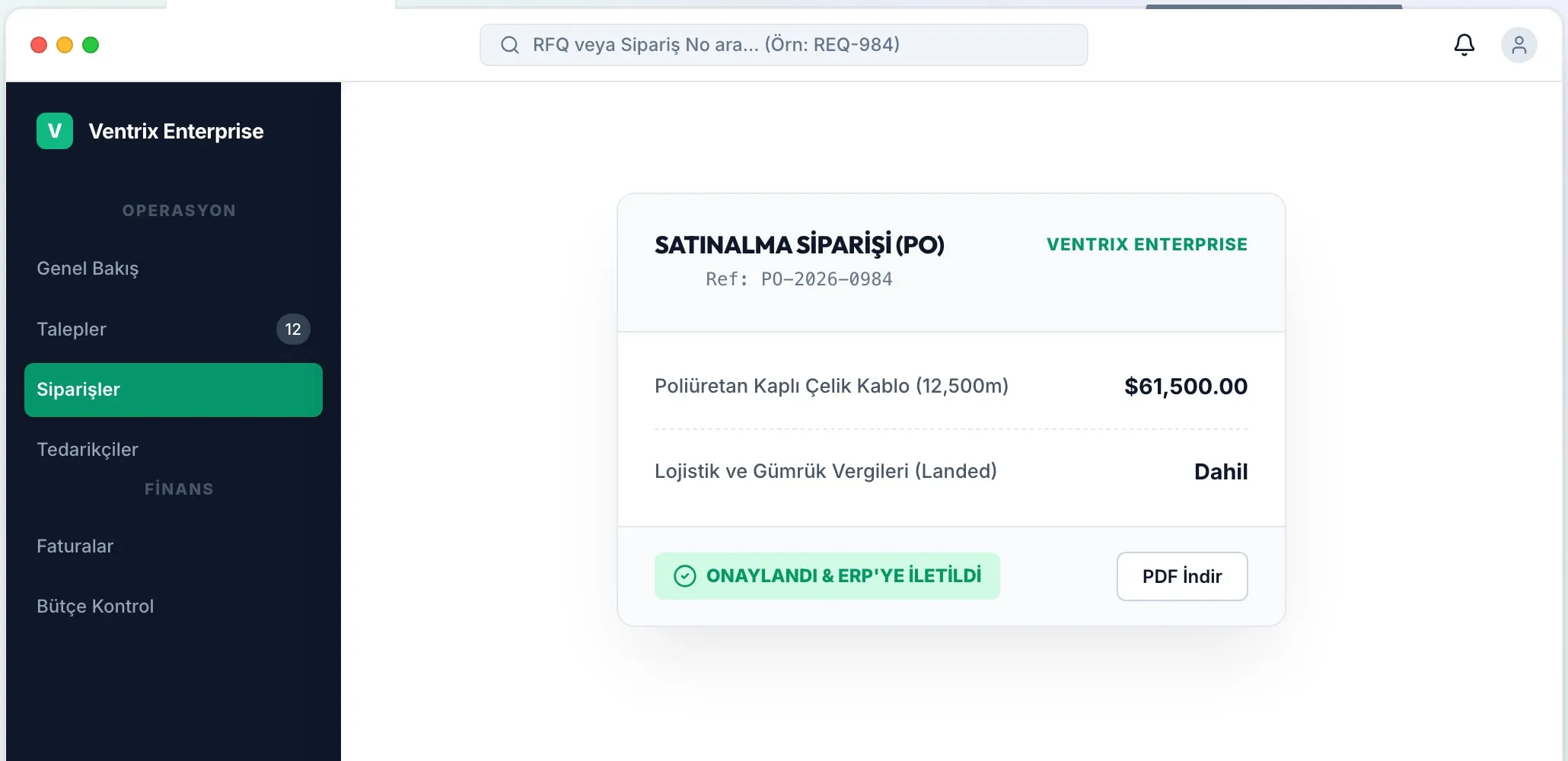
Ventrix purchase order: approved and sent to the ERP
In short

End-to-end procurement management for manufacturing, automotive, raw materials, wholesale and all industrial sectors. AI email parsing, a supplier quote matrix and a landed cost engine.

How does Ventrix work from request to delivery?

Watch the four steps in order or click a step. The companies, products and amounts on the screens are samples.

Step 01 · AI reads the request

The request arrives and the line items separate on their own

A request from a customer or a department can be an email, a PDF specification or an Excel list. Ventrix reads the text, separates the line items and turns them into a request for quotation (RFQ).

  • Reads PDF specifications, Excel material lists and email text
  • Part code, size, standard and quantity are matched against the catalog
  • The request goes to the relevant supplier group without waiting in an inbox
Step 1 / 4
  • 01

    Zero manual data entry

    Turns PDF quotes, invoices and emails into structured data (JSON/XML) in seconds.

  • 02

    Smart matching

    Learns from your past purchases and automatically suggests the most suitable suppliers for new requests.

  • 03

    ERP integration

    Two-way real-time synchronization with ERP systems such as SAP, Oracle and Logo.

One panel from request to order

Ventrix inbox screen
Inbox (active requests)

Incoming requests in one list

Reads customer orders, quote requests and supplier quote emails instantly with AI; transfers part numbers, quantities, unit prices and lead times into the system automatically.

  • Multiple RFQs and bulk quote collection
  • Quote comparison matrix
  • Distributor API integrations
Ventrix purchase order screen
PURCHASE ORDER (PO)

The approved order is sent to the ERP

Calculate unit price + freight per kg + insurance + storage + customs duty + exchange rate and profit margin on one screen to create a profitable customer proforma.

  • Landed cost calculator
  • Analytics and demand forecasting
  • Customer quote and revision management

See how Ventrix would work in your business

Tell us briefly about your process and we will walk through the screens with your own example.

  • Reply the same business day
  • 15+ years of experience
  • 90 client businesses

Put an end to the email and Excel chaos

Ventrix puts your manual processes, which used to take days, get overlooked and lose money, on autopilot.

  1. 01 Zero loss and AI auto-detection

    Manual process

    Overlooked customer requests: customer RFQs lost among hundreds of emails in the inbox, left unopened for days, and the sales opportunities lost with them.

    With Ventrix

    Every incoming email is scanned instantly by AI; the part number, quantity and target price are extracted and entered into the system within seconds.

  2. 02 One-click bulk RFQ and automatic supplier distribution

    Manual process

    Undelivered or forgotten supplier orders: orders not sent to the supplier on time, lead times that go untracked and late deliveries that cost you customers.

    With Ventrix

    A templated request goes to dozens of suppliers with one click, and the replies are compared side by side in the matrix automatically.

  3. 03 Flawless landed cost and instant proforma

    Manual process

    Cost calculation and the risk of losing money: unprofitable quotes caused by mistakes when manually calculating freight, insurance and customs duties across Excel sheets.

    With Ventrix

    Unit cost + air/sea freight + customs and profit margin are calculated to the cent on one screen, and profitability is guaranteed.

  4. 04 An end-to-end integrated cycle on one platform

    Manual process

    A software junkyard and the pain of manual invoicing: the quote in one program, the order in another, stock in Excel, the invoice in accounting… Endless copy-paste and days of lost time.

    With Ventrix

    RFQ → Quote Matrix → Proforma → Supplier PO → Order and Invoice flow connected to each other in one system.

How does Ventrix work?

We free your procurement operations from complicated spreadsheets and automate them step by step.

  1. 1

    The request arrives and AI detects it

    The email or Excel list from the customer lands in the system. AI turns the whole parts list into structured data within seconds.

    Automatic parsing
  2. 2

    Distribution to suppliers and comparison

    The request goes to approved supplier groups with one click. Replies are ranked in the live comparison matrix with a best-price badge.

    Live matrix
  3. 3

    Delivered cost and proforma generation

    Real freight per kg, insurance and customs duty are calculated. A professional PDF proforma with your chosen profit margin goes to the customer.

    Profitable pricing
  4. 4

    Order and delivery tracking

    When the customer accepts, the supplier PO and the customer order are created with one click. Track it up to delivery on a visual timeline.

    End-to-end delivery

Dynamic quote comparison

Supplier quotes line up side by side with unit price, lead time and total delivered cost; the best scenario is approved.

EVALUATION CRITERION SUPPLIER A (GLOBAL) SUPPLIER B (LOCAL - AI RECOMMENDATION)
Unit price$1,240.00$1,180.00
Lead time (delivery)21 days14 days
Landed cost (total cost)$65,000.00$61,500.00
This is a sample display.

End-to-end B2B procurement management suite

Purpose-built tools for every stage, from part request to customs cost, from quote comparison to delivery.

  • AI-powered email parsing

    Reads customer orders, quote requests and supplier quote emails instantly with AI; transfers part numbers, quantities, unit prices and lead times into the system automatically.

  • Multiple RFQs and bulk quote collection

    Send customer requests with one click to dozens of suppliers or to defined supplier groups using email templates, and track whether they were opened.

  • Quote comparison matrix

    See all supplier quotes side by side by component. Highlight the best price, lead time and date code automatically.

  • Landed cost calculator

    Calculate unit price + freight per kg + insurance + storage + customs duty + exchange rate and profit margin on one screen to create a profitable customer proforma.

  • Smart Insights and AI price suggestion

    Analyzes the past 12 months of quote data to suggest the optimal purchase price and catches market anomalies and excessive prices instantly.

  • Analytics and demand forecasting

    Make strategic decisions with next-period demand projections, cash flow trends and exchange rate change simulations.

  • Purchase and sales order management

    Manage the whole lifecycle of POs and customer orders with a visual timeline, an infographic progress bar and a multi-level approval workflow.

  • Customer quote and revision management

    Get professional PDF/Excel proforma output, keep revision versions and turn a quote into an order with one click when the customer accepts.

  • CRM: customer and supplier cards

    Domain alias matching, multiple contact persons, built-in Chatter notes and an audit log of all system activity.

  • Distributor API integrations

    Query real-time stock, prices and automatic part weight (scraping) through official APIs such as DigiKey and Mouser.

  • Parts library and warehouse stock tracking

    A central part number database, warehouse in and out movements and a wizard for bulk importing your existing Excel data.

  • Manager dashboard and KPI tracking

    Instant company performance with sales/purchase volume, a summary of open orders, pending leads and dynamic period filters.

  • Excel-style SlimTable and data grid

    Excel filter popovers, checklist filtering, an instant Sum/Average/Min/Max status bar on selected rows and XLSX export.

  • Global search and Command Palette (Ctrl+K)

    Reach any page, order, customer or part number from the keyboard with a single key press.

  • Granular role and security management

    View/add/edit/delete permissions by module, user groups and enterprise-level data security.

What does Panda AI add alongside Ventrix?

The Purchasing and Supply Agent is the Panda AI agent that puts incoming quotes into a comparison table and drafts purchase requests for critical stock.

  1. Today Supplier quotes are copied into a table by hand With the agent Incoming quotes are ready in a comparison table
  2. Today Critical stock levels are noticed late With the agent A draft purchase request for critical stock
  3. Today Late orders are chased by phone With the agent Alerts for orders whose delivery date is approaching

Jobs it takes on

  • Collecting and comparing quotes
  • Supplier performance summary
  • Open order and delay tracking
  • Draft purchase requests
  • Price change alerts
  • Draft e-mails to suppliers

The agent prepares, a person approves. Anything that posts a record or sends something outside the company goes through your approval.

Explore Panda AI agents

Do you have a question in mind?

Ask our specialist. If it is not the right fit for you, we will say so.

  • Reply the same business day
  • 15+ years of experience
  • 90 client businesses

Suited to every area of procurement and sourcing

  • Manufacturing and machinery
  • Automotive and heavy industry
  • Metal, plastic and raw materials
  • Wholesale B2B trade and imports
  • High technology and hardware

Frequently asked questions about Ventrix

Is Ventrix used only for electronic components?

No. Although it has dedicated API and weight tools for the electronics sector, it is fully suited to all companies in machinery, automotive, medical, raw materials and general B2B wholesale trade.

Can we install it on our own servers (on-premise)?

Yes. Under our Enterprise plan, you can install it fully isolated on your own company servers using Docker containers.

Can we import our existing Excel data?

Yes. With the Excel Import wizard you can bring your customer, supplier and parts lists into the system within minutes.

Does it integrate with our existing ERP (SAP, Logo, etc.)?

Yes. Ventrix has ready-made API integrations with popular ERPs such as SAP, Oracle, MS Dynamics, Logo and Mikro. Two-way data flow is instant.

How long does setup take?

For cloud (SaaS) plans, setup is completed within 24 hours. Enterprise setups that need on-premise installation and custom ERP integration take 2-4 weeks on average.

Do suppliers need to sign up to the system?

No! Your suppliers keep sending you emails or PDFs as usual. Ventrix reads them in the background and enters them into the system.

See Ventrix with your own data

Describe your process in a few sentences and we will show you the modules that fit.

  • 15+ years of enterprise software experience
  • In the cloud or on your own server
  • Processes compliant with KVKK (Turkey's data protection law)